Help Your People Find Their People: Introducing Groups in Tithely Church Management
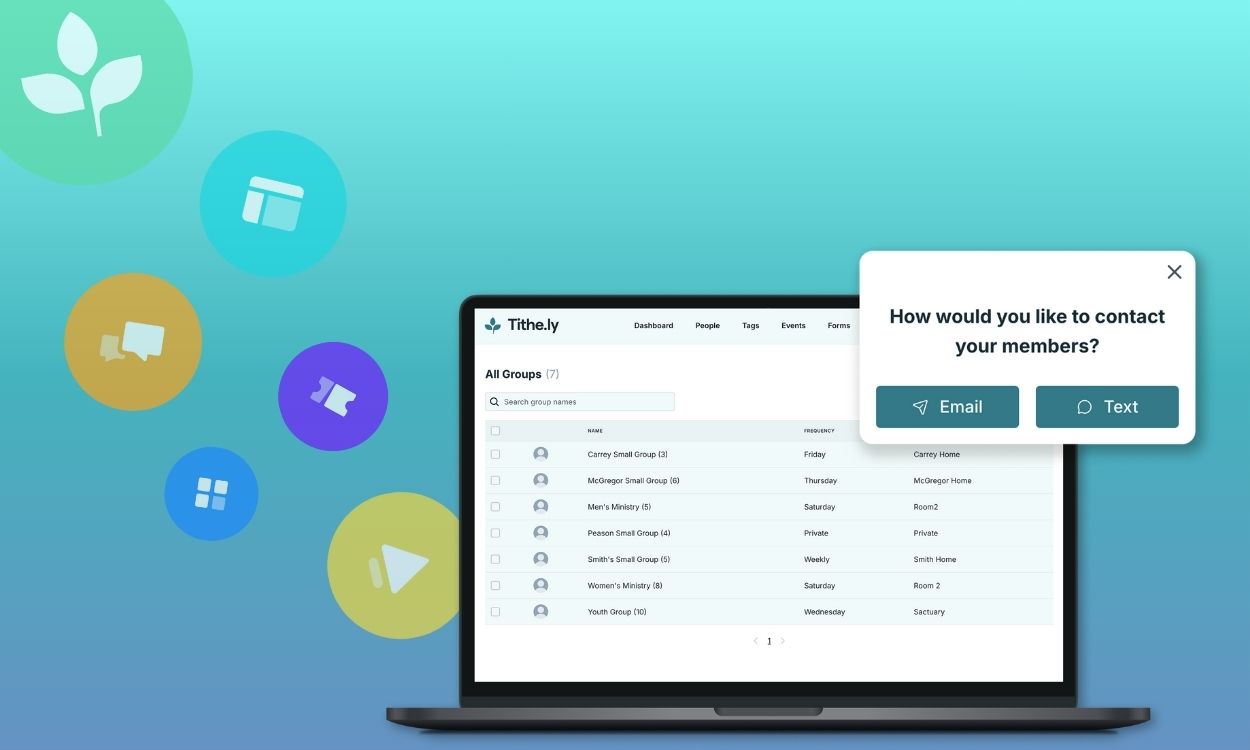
Building real, lasting connections in your church shouldn’t be complicated. That’s why we’re excited to roll out Groups—a powerful new feature inside Tithely Church Management and your Church App. Whether you’re organizing small groups, volunteer teams, or ministry events, Groups makes it easy to connect the right people with the right purpose—no spreadsheets, no extra tools, just streamlined communication and seamless access. It’s the simplest way to strengthen community and empower ministry leaders—all in one place.



In every thriving church community, relationships are the heartbeat. From small groups to worship teams, youth ministries to Bible studies—these connections help people grow in faith and feel like they belong.
That’s why we’re excited to introduce Groups, a new feature built directly into Tithely Church Management and your Church App. With Groups, churches can easily create, organize, and communicate with their ministries, all from one place.
What You Can Do With Tithely Groups
Here’s what makes Groups a game-changer for church leaders:
- Fully Integrated – No more switching between apps or making awkward workarounds with tags. Groups live right inside your Tithely ChMS and Church App.
- Easy Setup – Turn existing tags into groups, add members in seconds, and choose whether the group is public or private in your app.
- Better Communication – Send an email or text to group members or leaders with just a few clicks.
- Smarter Planning – Link groups to events, display them in your app, and let people request to join.
- Peace of Mind for Admins – Groups sync with profiles and events, making it easier to track participation.
Tithely Groups Features
The new Groups experience isn’t just a small tweak—it’s a full upgrade for how your church organizes and connects people. Here’s what’s now possible:
- Custom Group Types – Create any kind of group, from small groups to volunteer teams, each with its own settings.
- Detailed Group Info – Add meeting times, locations, and other custom fields so members know exactly when and where to connect.
- Push Notifications – Send announcements directly to specific groups in the app, or schedule them for the right time.
- Member Notification Control – Let users choose which notifications they want to receive.
- Built-In Group Chat – Keep conversations in one place with messaging right inside the app.
- Rich Media Sharing – Post photos, videos, GIFs, and react with emojis to keep things personal and fun.
- Online Status Indicators – See who’s active at a glance, with avatars showing online or offline status.
- Leader Chat Controls – Group leaders can delete messages if needed, helping keep discussions healthy.
- Easy App Access – Members can find and join groups quickly from a dedicated Groups tab in the Church App.
Why Groups Matter for Your Church
Research consistently shows that church members who are part of a small group or ministry team are more likely to stay engaged and grow spiritually. But managing these groups can be a challenge—especially if you’re juggling spreadsheets, text chains, and outdated tools.
Groups in Tithely ChMS solves that by giving you one central hub for your people and their connections. Whether it’s the hospitality team, a midweek Bible study, or the kids’ ministry volunteer roster, everything (and everyone) is organized.
Before vs. After: How Groups Transforms Church Organization
| Without Tithely Groups (Before) | With Tithely Groups (After) |
|---|---|
| Multiple tools for events, messaging, and member lists | All-in-one hub for group info, chat, events, and communication |
| Spreadsheets and manual sign-up forms | Members join groups directly through the Church App |
| Group messages sent via email chains or personal text threads | Built-in group chat with rich media sharing and emojis |
| No way to see who’s online | Avatars show live online/offline status |
| One-size-fits-all notifications | Push notifications targeted to specific groups and user preferences |
| Difficult to coordinate meetings | Custom group info includes meeting times, locations, and details |
| Limited control over group conversations | Leaders can moderate and delete chat messages |
| Volunteers miss updates or get them too late | Scheduled notifications ensure timely reminders |
Without Tithely Groups (Before)
- Multiple tools for events, messaging, and member lists
- Spreadsheets and manual sign-up forms
- Group messages sent via email chains or personal text threads
- No way to see who’s online
- One-size-fits-all notifications
- Difficult to coordinate meetings
- Limited control over group conversations
- Volunteers miss updates or get them too late
With Tithely Groups (After)
- All-in-one hub for group info, chat, events, and communication
- Members join groups directly through the Church App
- Built-in group chat with rich media sharing and emojis
- Avatars show live online/offline status
- Push notifications targeted to specific groups and user preferences
- Custom group info includes meeting times, locations, and details
- Leaders can moderate and delete chat messages
- Scheduled notifications ensure timely reminders
Real-Life Ways Churches Can Use Groups
If you’re wondering where to start, here are some examples from churches already using Groups:
Available Now for New Tithely Customers
Groups is live for Tithely 3.0 customers and new churches joining through our website. You’ll see the new “Groups” tab in your Church Management dashboard and Church App.
For existing customers and those using Breeze ChMS, Groups is here — see how to turn your existing Breeze tags into groups in minutes.
How to Start Using Groups Today
- Log in to your Tithely ChMS and look for the Groups tab.
- Create your first group by selecting an existing tag or adding members manually.
- Invite leaders and start communicating directly through email or text.
- Make it visible in your Church App so members can find and join the right group.
You can explore more on our updated Groups product page or watch the step-by-step demo in your dashboard.
Sign Up for Product Updates

Chris Dunagan is a marketing strategist focused on church tech and digital engagement. He helps churches grow through SEO, email campaigns, and tools like Tithely and Breeze ChMS, with an emphasis on online giving, content strategy, and digital outreach.
In every thriving church community, relationships are the heartbeat. From small groups to worship teams, youth ministries to Bible studies—these connections help people grow in faith and feel like they belong.
That’s why we’re excited to introduce Groups, a new feature built directly into Tithely Church Management and your Church App. With Groups, churches can easily create, organize, and communicate with their ministries, all from one place.
What You Can Do With Tithely Groups
Here’s what makes Groups a game-changer for church leaders:
- Fully Integrated – No more switching between apps or making awkward workarounds with tags. Groups live right inside your Tithely ChMS and Church App.
- Easy Setup – Turn existing tags into groups, add members in seconds, and choose whether the group is public or private in your app.
- Better Communication – Send an email or text to group members or leaders with just a few clicks.
- Smarter Planning – Link groups to events, display them in your app, and let people request to join.
- Peace of Mind for Admins – Groups sync with profiles and events, making it easier to track participation.
Tithely Groups Features
The new Groups experience isn’t just a small tweak—it’s a full upgrade for how your church organizes and connects people. Here’s what’s now possible:
- Custom Group Types – Create any kind of group, from small groups to volunteer teams, each with its own settings.
- Detailed Group Info – Add meeting times, locations, and other custom fields so members know exactly when and where to connect.
- Push Notifications – Send announcements directly to specific groups in the app, or schedule them for the right time.
- Member Notification Control – Let users choose which notifications they want to receive.
- Built-In Group Chat – Keep conversations in one place with messaging right inside the app.
- Rich Media Sharing – Post photos, videos, GIFs, and react with emojis to keep things personal and fun.
- Online Status Indicators – See who’s active at a glance, with avatars showing online or offline status.
- Leader Chat Controls – Group leaders can delete messages if needed, helping keep discussions healthy.
- Easy App Access – Members can find and join groups quickly from a dedicated Groups tab in the Church App.
Why Groups Matter for Your Church
Research consistently shows that church members who are part of a small group or ministry team are more likely to stay engaged and grow spiritually. But managing these groups can be a challenge—especially if you’re juggling spreadsheets, text chains, and outdated tools.
Groups in Tithely ChMS solves that by giving you one central hub for your people and their connections. Whether it’s the hospitality team, a midweek Bible study, or the kids’ ministry volunteer roster, everything (and everyone) is organized.
Before vs. After: How Groups Transforms Church Organization
| Without Tithely Groups (Before) | With Tithely Groups (After) |
|---|---|
| Multiple tools for events, messaging, and member lists | All-in-one hub for group info, chat, events, and communication |
| Spreadsheets and manual sign-up forms | Members join groups directly through the Church App |
| Group messages sent via email chains or personal text threads | Built-in group chat with rich media sharing and emojis |
| No way to see who’s online | Avatars show live online/offline status |
| One-size-fits-all notifications | Push notifications targeted to specific groups and user preferences |
| Difficult to coordinate meetings | Custom group info includes meeting times, locations, and details |
| Limited control over group conversations | Leaders can moderate and delete chat messages |
| Volunteers miss updates or get them too late | Scheduled notifications ensure timely reminders |
Without Tithely Groups (Before)
- Multiple tools for events, messaging, and member lists
- Spreadsheets and manual sign-up forms
- Group messages sent via email chains or personal text threads
- No way to see who’s online
- One-size-fits-all notifications
- Difficult to coordinate meetings
- Limited control over group conversations
- Volunteers miss updates or get them too late
With Tithely Groups (After)
- All-in-one hub for group info, chat, events, and communication
- Members join groups directly through the Church App
- Built-in group chat with rich media sharing and emojis
- Avatars show live online/offline status
- Push notifications targeted to specific groups and user preferences
- Custom group info includes meeting times, locations, and details
- Leaders can moderate and delete chat messages
- Scheduled notifications ensure timely reminders
Real-Life Ways Churches Can Use Groups
If you’re wondering where to start, here are some examples from churches already using Groups:
Available Now for New Tithely Customers
Groups is live for Tithely 3.0 customers and new churches joining through our website. You’ll see the new “Groups” tab in your Church Management dashboard and Church App.
For existing customers and those using Breeze ChMS, Groups is here — see how to turn your existing Breeze tags into groups in minutes.
How to Start Using Groups Today
- Log in to your Tithely ChMS and look for the Groups tab.
- Create your first group by selecting an existing tag or adding members manually.
- Invite leaders and start communicating directly through email or text.
- Make it visible in your Church App so members can find and join the right group.
You can explore more on our updated Groups product page or watch the step-by-step demo in your dashboard.
podcast transcript
Chris Dunagan is a marketing strategist focused on church tech and digital engagement. He helps churches grow through SEO, email campaigns, and tools like Tithely and Breeze ChMS, with an emphasis on online giving, content strategy, and digital outreach.
In every thriving church community, relationships are the heartbeat. From small groups to worship teams, youth ministries to Bible studies—these connections help people grow in faith and feel like they belong.
That’s why we’re excited to introduce Groups, a new feature built directly into Tithely Church Management and your Church App. With Groups, churches can easily create, organize, and communicate with their ministries, all from one place.
What You Can Do With Tithely Groups
Here’s what makes Groups a game-changer for church leaders:
- Fully Integrated – No more switching between apps or making awkward workarounds with tags. Groups live right inside your Tithely ChMS and Church App.
- Easy Setup – Turn existing tags into groups, add members in seconds, and choose whether the group is public or private in your app.
- Better Communication – Send an email or text to group members or leaders with just a few clicks.
- Smarter Planning – Link groups to events, display them in your app, and let people request to join.
- Peace of Mind for Admins – Groups sync with profiles and events, making it easier to track participation.
Tithely Groups Features
The new Groups experience isn’t just a small tweak—it’s a full upgrade for how your church organizes and connects people. Here’s what’s now possible:
- Custom Group Types – Create any kind of group, from small groups to volunteer teams, each with its own settings.
- Detailed Group Info – Add meeting times, locations, and other custom fields so members know exactly when and where to connect.
- Push Notifications – Send announcements directly to specific groups in the app, or schedule them for the right time.
- Member Notification Control – Let users choose which notifications they want to receive.
- Built-In Group Chat – Keep conversations in one place with messaging right inside the app.
- Rich Media Sharing – Post photos, videos, GIFs, and react with emojis to keep things personal and fun.
- Online Status Indicators – See who’s active at a glance, with avatars showing online or offline status.
- Leader Chat Controls – Group leaders can delete messages if needed, helping keep discussions healthy.
- Easy App Access – Members can find and join groups quickly from a dedicated Groups tab in the Church App.
Why Groups Matter for Your Church
Research consistently shows that church members who are part of a small group or ministry team are more likely to stay engaged and grow spiritually. But managing these groups can be a challenge—especially if you’re juggling spreadsheets, text chains, and outdated tools.
Groups in Tithely ChMS solves that by giving you one central hub for your people and their connections. Whether it’s the hospitality team, a midweek Bible study, or the kids’ ministry volunteer roster, everything (and everyone) is organized.
Before vs. After: How Groups Transforms Church Organization
| Without Tithely Groups (Before) | With Tithely Groups (After) |
|---|---|
| Multiple tools for events, messaging, and member lists | All-in-one hub for group info, chat, events, and communication |
| Spreadsheets and manual sign-up forms | Members join groups directly through the Church App |
| Group messages sent via email chains or personal text threads | Built-in group chat with rich media sharing and emojis |
| No way to see who’s online | Avatars show live online/offline status |
| One-size-fits-all notifications | Push notifications targeted to specific groups and user preferences |
| Difficult to coordinate meetings | Custom group info includes meeting times, locations, and details |
| Limited control over group conversations | Leaders can moderate and delete chat messages |
| Volunteers miss updates or get them too late | Scheduled notifications ensure timely reminders |
Without Tithely Groups (Before)
- Multiple tools for events, messaging, and member lists
- Spreadsheets and manual sign-up forms
- Group messages sent via email chains or personal text threads
- No way to see who’s online
- One-size-fits-all notifications
- Difficult to coordinate meetings
- Limited control over group conversations
- Volunteers miss updates or get them too late
With Tithely Groups (After)
- All-in-one hub for group info, chat, events, and communication
- Members join groups directly through the Church App
- Built-in group chat with rich media sharing and emojis
- Avatars show live online/offline status
- Push notifications targeted to specific groups and user preferences
- Custom group info includes meeting times, locations, and details
- Leaders can moderate and delete chat messages
- Scheduled notifications ensure timely reminders
Real-Life Ways Churches Can Use Groups
If you’re wondering where to start, here are some examples from churches already using Groups:
Available Now for New Tithely Customers
Groups is live for Tithely 3.0 customers and new churches joining through our website. You’ll see the new “Groups” tab in your Church Management dashboard and Church App.
For existing customers and those using Breeze ChMS, Groups is here — see how to turn your existing Breeze tags into groups in minutes.
How to Start Using Groups Today
- Log in to your Tithely ChMS and look for the Groups tab.
- Create your first group by selecting an existing tag or adding members manually.
- Invite leaders and start communicating directly through email or text.
- Make it visible in your Church App so members can find and join the right group.
You can explore more on our updated Groups product page or watch the step-by-step demo in your dashboard.
VIDEO transcript
In every thriving church community, relationships are the heartbeat. From small groups to worship teams, youth ministries to Bible studies—these connections help people grow in faith and feel like they belong.
That’s why we’re excited to introduce Groups, a new feature built directly into Tithely Church Management and your Church App. With Groups, churches can easily create, organize, and communicate with their ministries, all from one place.
What You Can Do With Tithely Groups
Here’s what makes Groups a game-changer for church leaders:
- Fully Integrated – No more switching between apps or making awkward workarounds with tags. Groups live right inside your Tithely ChMS and Church App.
- Easy Setup – Turn existing tags into groups, add members in seconds, and choose whether the group is public or private in your app.
- Better Communication – Send an email or text to group members or leaders with just a few clicks.
- Smarter Planning – Link groups to events, display them in your app, and let people request to join.
- Peace of Mind for Admins – Groups sync with profiles and events, making it easier to track participation.
Tithely Groups Features
The new Groups experience isn’t just a small tweak—it’s a full upgrade for how your church organizes and connects people. Here’s what’s now possible:
- Custom Group Types – Create any kind of group, from small groups to volunteer teams, each with its own settings.
- Detailed Group Info – Add meeting times, locations, and other custom fields so members know exactly when and where to connect.
- Push Notifications – Send announcements directly to specific groups in the app, or schedule them for the right time.
- Member Notification Control – Let users choose which notifications they want to receive.
- Built-In Group Chat – Keep conversations in one place with messaging right inside the app.
- Rich Media Sharing – Post photos, videos, GIFs, and react with emojis to keep things personal and fun.
- Online Status Indicators – See who’s active at a glance, with avatars showing online or offline status.
- Leader Chat Controls – Group leaders can delete messages if needed, helping keep discussions healthy.
- Easy App Access – Members can find and join groups quickly from a dedicated Groups tab in the Church App.
Why Groups Matter for Your Church
Research consistently shows that church members who are part of a small group or ministry team are more likely to stay engaged and grow spiritually. But managing these groups can be a challenge—especially if you’re juggling spreadsheets, text chains, and outdated tools.
Groups in Tithely ChMS solves that by giving you one central hub for your people and their connections. Whether it’s the hospitality team, a midweek Bible study, or the kids’ ministry volunteer roster, everything (and everyone) is organized.
Before vs. After: How Groups Transforms Church Organization
| Without Tithely Groups (Before) | With Tithely Groups (After) |
|---|---|
| Multiple tools for events, messaging, and member lists | All-in-one hub for group info, chat, events, and communication |
| Spreadsheets and manual sign-up forms | Members join groups directly through the Church App |
| Group messages sent via email chains or personal text threads | Built-in group chat with rich media sharing and emojis |
| No way to see who’s online | Avatars show live online/offline status |
| One-size-fits-all notifications | Push notifications targeted to specific groups and user preferences |
| Difficult to coordinate meetings | Custom group info includes meeting times, locations, and details |
| Limited control over group conversations | Leaders can moderate and delete chat messages |
| Volunteers miss updates or get them too late | Scheduled notifications ensure timely reminders |
Without Tithely Groups (Before)
- Multiple tools for events, messaging, and member lists
- Spreadsheets and manual sign-up forms
- Group messages sent via email chains or personal text threads
- No way to see who’s online
- One-size-fits-all notifications
- Difficult to coordinate meetings
- Limited control over group conversations
- Volunteers miss updates or get them too late
With Tithely Groups (After)
- All-in-one hub for group info, chat, events, and communication
- Members join groups directly through the Church App
- Built-in group chat with rich media sharing and emojis
- Avatars show live online/offline status
- Push notifications targeted to specific groups and user preferences
- Custom group info includes meeting times, locations, and details
- Leaders can moderate and delete chat messages
- Scheduled notifications ensure timely reminders
Real-Life Ways Churches Can Use Groups
If you’re wondering where to start, here are some examples from churches already using Groups:
Available Now for New Tithely Customers
Groups is live for Tithely 3.0 customers and new churches joining through our website. You’ll see the new “Groups” tab in your Church Management dashboard and Church App.
For existing customers and those using Breeze ChMS, Groups is here — see how to turn your existing Breeze tags into groups in minutes.
How to Start Using Groups Today
- Log in to your Tithely ChMS and look for the Groups tab.
- Create your first group by selecting an existing tag or adding members manually.
- Invite leaders and start communicating directly through email or text.
- Make it visible in your Church App so members can find and join the right group.
You can explore more on our updated Groups product page or watch the step-by-step demo in your dashboard.
Sign Up for Product Updates
Chris Dunagan is a marketing strategist focused on church tech and digital engagement. He helps churches grow through SEO, email campaigns, and tools like Tithely and Breeze ChMS, with an emphasis on online giving, content strategy, and digital outreach.

You Might Also Like
More Resources

From increasing giving, managing your congregation, and engaging your church, our collection of resources will keep you up-to-date on the latest church and ministry trends.
Free Resources