The Mother's Day Follow-Up Playbook: How Small Churches Can Turn Once-a-Year Visitors Into Lifelong Friends
A practical guide for the small-church administrator who already wears too many hats.




Mother's Day is one of the three Sundays a year your sanctuary fills up with people you don't recognize — and that's a beautiful problem to have.
Most of those new faces aren't "visitors" in the traditional sense. They're Linda's son from Dallas. They're the granddaughter who drove in from Raleigh the night before. They're the son-in-law who hasn't been inside a church since his own grandmother's funeral eight years ago. They came because Mom asked, and they'll probably be gone by Monday morning.
Here's the honest truth: most of those guests will never darken your door again. But a meaningful handful will — if you reach out in the right way, at the right time, with the right level of warmth. And you don't need a seven-person communications team to do it. You just need a simple plan and a couple of tools that do the heavy lifting for you.
This guide is for the person at your church who keeps the trains running. The one who sets up the coffee, prints the bulletins, and knows every family by name. You're going to love how doable this is.
Mother's Day is often the only Sunday a year some families worship together. That makes your follow-up worth the effort.

Why Mother's Day guests are different (and why it matters)
A normal first-time guest on a normal Sunday is usually exploring. They're looking for a church home, maybe because they just moved to town, maybe because they're walking back toward faith. Your follow-up can lean into, "We'd love to see you again."
Mother's Day guests are a different animal. Many of them are:
- Out-of-town family who flew in Saturday and leave Sunday afternoon.
- Adult children who drove four hours to take Mom to brunch and came to her church because she asked.
- Grandkids who might live three states away.
- Sons-in-law or daughters-in-law who already have a church (or haven't looked for one in years).
"Come back next Sunday" doesn't fit any of them. But something else does: you have an open door to bless them right where they live. That's the whole strategy. Don't try to turn a Knoxville grandson into a regular attendee at your church in Greenville. Instead, be the church that encouraged him, prayed for him, and pointed him toward his own next step at home.
When you reframe follow-up that way, the pressure goes down — and the kindness goes up.
The 48-hour window: why timing beats everything
Here's one of the few pieces of "church growth data" I'd stake my reputation on: a thoughtful message sent within 48 hours of someone's visit lands ten times harder than a beautifully crafted one sent the following Friday.
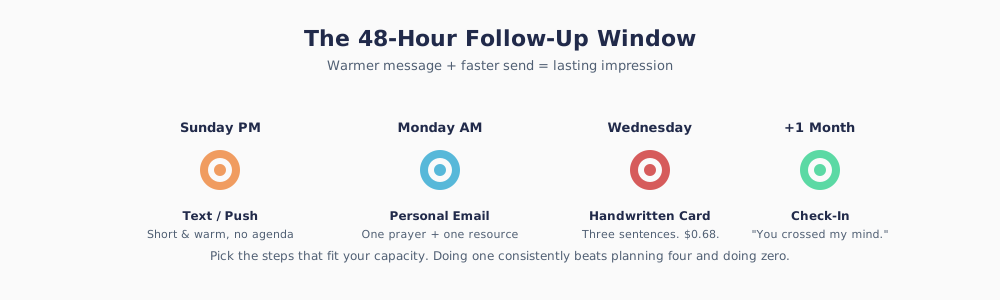
Your simple timeline:
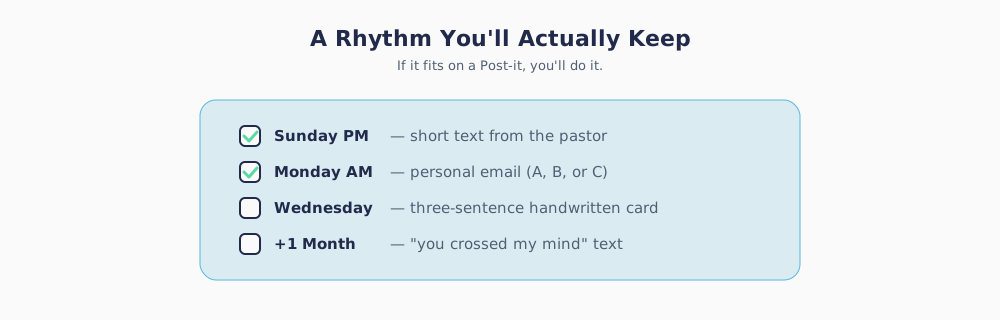
- Sunday afternoon or evening: A short text or push notification — just warmth, no agenda.
- Monday morning: A personal email from the pastor (or on the pastor's behalf) with one prayer and one resource.
- Wednesday: A handwritten card in the mail, if you have a physical address.
You don't need to do all three for every guest. Pick the ones that fit your capacity. Doing one thing consistently is better than planning four and doing zero.
Step 1: Capture the info — without the awkward clipboard
You cannot follow up with guests whose names and contact info you didn't collect. This is the step most churches fumble, because pen-and-paper cards feel a little 1987, and guests (especially out-of-town ones) often skip them.
This is where Tithely Tap earns its keep on Mother's Day more than almost any other Sunday of the year.
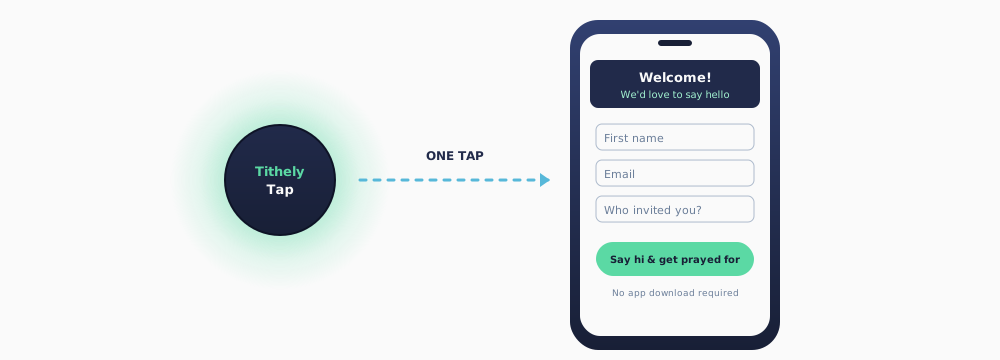
Tithely Tap is a small, inexpensive NFC disc that opens a link the instant someone's phone touches it. Most people know how to do this already — it's the same motion as tapping to pay at the grocery store. No app download. No QR code. No typing.
Here are five ways to use Tithely Tap specifically for Mother's Day:
1. The "Welcome Home to Mom's Church" disc. Put a Tap disc on the back of each pew. When a guest taps it, it opens a simple welcome form with three fields: name, email, and "who invited you today?" That last field is gold.
2. The carnation table. If you hand out flowers to the moms, put a Tap disc on the welcome table where family members are taking photos. A small sign that reads "Tap here to say hi — we'd love to send you a prayer this week" turns a warm moment into a captured name.
3. The greeter's lanyard. A few of your warmest greeters can wear a Tap disc on a lanyard. When a conversation gets going with a guest, it's natural to say "Let me get you on my list for prayer — just tap here." It feels human, not administrative.
4. The coffee bar "thank-you" tap. After the service, a small sign near the coffee: "Thanks for worshiping with us today. Tap to let us pray for you this week." People who won't fill out a card will almost always do this one.
5. The "We're glad you were here" exit disc. Catch them on the way out with a, "Let us know how your experience was today." Place a tap disc on a wall near the exit or on the back of the exit door. A quick tap on their way out is convenient and one last chance to gather follow-up info.
The form behind every Tap disc should be embarrassingly short. Three fields, maybe four. The longer your form, the fewer guests you'll hear from.
Step 2: The Sunday-afternoon text message
A text sent Sunday between 2:00 and 6:00 p.m. is the single highest-performing message in your whole follow-up sequence. The service is still fresh, the guest is probably at lunch with family, and they've got their phone in hand.
Here's a template you can adapt. Keep it short, warm, and unbranded.
Text · Sunday afternoon Hi [First Name] — this is Pastor [Last Name] at [Church Name]. It was such a joy to have you with us this morning. I know today was about celebrating your mom, and I'm so glad we got to be a small part of it. Praying a peaceful week over you and your family. No need to reply.
A few things to notice about that text:
- It names the guest.
- It signs off from a real person, not "the team."
- It acknowledges why they were there (Mom), not just that they were there.
- It closes the loop: no need to reply. That sentence alone doubles how warm it feels.
If you're using Tithely's Messaging tool inside your church management system, you can send these as a batch and still have each one feel personal, because the first-name merge happens automatically.
For churches with a mobile app: the push notification
If your church has the Tithely Church App, you can send a push notification to anyone who downloaded the app during their visit (a surprisingly common thing when grandma has been talking up the church for a year). Keep it even shorter than the text:
Push · Sunday afternoon From Pastor [Last Name]: Thank you for worshiping with us today. Praying a blessed week over you and your family. 💐
One emoji is plenty. Two is too many.
Step 3: The Monday-morning email
Monday morning between 9:00 and 11:00 a.m. is your email sweet spot. People have worked through the weekend inbox and are sitting down to their real work. A thoughtful email from a pastor stands out.
I'd recommend writing three slightly different emails and choosing based on what you know about the guest. Most small churches already know more than they think — the mom they came with, the flower they picked up, whether they sang or stayed quiet. Lean into that knowledge.
Email Template A: The out-of-town family member
Use this when you know the guest traveled to be with Mom or Grandma.
Subject: So glad you were with [Parent/Grandparent's Name] yesterday
Hi [First Name],
I know you probably don't live nearby, so this isn't an invitation to come back next Sunday. It's just an encouragement: whatever church life looks like in [Guest's City, if known], I'd love to be praying for you this week. If there's anything specific I can lift up, just hit reply.
And if you're ever not sure where to start with faith or church, I've got a short (and honest) little guide I send to friends: [link]. No strings attached.
Grateful you spent Mother's Day with us,
Pastor [Last Name]
[Church Name]
Email Template B: The local adult child or relative
Use this when the guest lives within driving distance and might realistically come back.
Subject: Thank you for worshiping with us yesterday
Hi [First Name],
It was a gift to have you with [Mom/Grandma] yesterday morning. I hope the rest of the day was full of good food, too many photos, and a long nap.
I know Mother's Day brings a lot of folks into our sanctuary who haven't been in a church in a while — and if that's you, I just want to say: no pressure, no agenda. You'd be welcome here any Sunday, not only the ones with flowers.
If I can pray for anything in your life or family this week, just reply to this email. I read every one.
With gratitude,
Pastor [Last Name]
[Church Name]
Email Template C: The guest who came alone or didn't give much info
Use this as your catch-all for anyone you can't place — maybe they tapped a disc but didn't share much beyond their name.
Subject: A prayer for your week
Hi [First Name],
Thank you for worshiping with us on Mother's Day. Whether this Sunday was easy or tender for you (and for a lot of folks, it's some of both), I'm grateful we got to share it.
I'm praying for you this week. That's it — no ask, no next step. Just a pastor who believes it matters that you walked through our doors.
If there's ever anything I can pray for specifically, my inbox is open.
Peace to you,
Pastor [Last Name]
[Church Name]
A small technical note for the tool-shy: if you're already using Tithely's Messaging inside the church management system, all three of these can be built as saved templates. You tag each guest A, B, or C when you enter them, and the right email goes to the right person with a couple of clicks. You don't have to write them from scratch ever again.
Step 4: The handwritten card (optional but powerful)
If a guest left you a mailing address — or if you can get one from the family member who invited them — a handwritten note mailed Wednesday is the single most memorable thing in your whole sequence. It costs $0.68 and takes three minutes.
A card doesn't need to be long. Three sentences is plenty.
"Dear [First Name], I just wanted to say how much it meant to have you with us on Mother's Day. [One specific detail — 'Seeing you sit next to your mom made my whole morning.']. Praying God's peace over you and your family this season. — Pastor [Last Name]"
Keep a stack of blank cards in your desk drawer. Write five a week. In a year, you'll have written to every Mother's Day guest from last spring.
Step 5: The one-month check-in (most churches skip this one)
Here's a small idea that punches above its weight: one month after Mother's Day, send a short text or email to every guest who gave you their contact info. Not a newsletter. Not an invitation. Just a check-in.
Text · One month later Hi [First Name] — it's Pastor [Last Name] again. You crossed my mind this week and I wanted to say I'm still praying for you and your family. Hope June is treating you kindly.
That's the whole message. You'd be surprised how often the reply that comes back starts a real conversation — sometimes a year after the visit.
A quick note on tech — for those of us who aren't tech people
If words like "NFC" and "push notification" make you want to close this tab, take a breath. You don't have to become a technologist to do any of this.
Here's the honest-to-goodness simple version of the tools in this article:
- Tithely Tap is a little plastic disc. You touch a phone to it and a page opens. That's it.
- A push notification is the same little popup your grocery app sends you. If you've ever used a coupon from your phone, you've received one.
- A messaging tool is a place where you type one message and it sends to the people on your list, one at a time, with their first name filled in.
You already know how to host guests, remember names, and write kind notes. The tools in this playbook just help you do those things at scale, so the fifth Mother's Day guest gets the same warmth as the first.
Your Mother's Day follow-up checklist
Tape this to the side of your desk. Walk through it the week before and the week of Mother's Day.
Two weeks before:
- Order or relocate your Tithely Tap discs. Decide where each one will live on Sunday.
- Write (or dust off) your three email templates — A, B, and C.
- Ask the pastor for a ten-second voice memo you can loosely script the texts from.
Saturday before Mother's Day:
- Place Tap discs at the welcome table, greeter lanyards, and coffee bar.
- Add a quick-tap welcome card to every pew.
- Load a blank draft of the Sunday text into your messaging tool.
Mother's Day Sunday:
- Collect every tapped entry from the weekend.
- Between 2:00 and 6:00 p.m., send the Sunday text.
Monday morning:
- Tag each new guest as A, B, or C.
- Send the Monday email.
Wednesday:
- Handwrite five cards.
Four weeks later:
- Send the one-month check-in.
One last word of encouragement
You don't have to do this perfectly. You really don't. A single warm text, sent two days late, from a real person who remembered the guest's name — that will always beat an elegant system nobody actually runs.
So give yourself the same grace you're going to extend to those out-of-town sons and grandkids on Mother's Day morning. They came because they love their mom. You're following up because you love your people. Those are both good reasons, and God does good things with both.
Happy Mother's Day, from all of us to the administrator holding the whole thing together.
Looking for the tools mentioned in this article? Tithely Tap (NFC discs), Text Messaging & Email, and the Tithely Church App all live inside the All-Access plan. If you're a small church, the Free Giving plan gets you started at no cost.
Sign Up for Product Updates

Chris Dunagan is a marketing strategist focused on church tech and digital engagement. He helps churches grow through SEO, email campaigns, and tools like Tithely and Breeze ChMS, with an emphasis on online giving, content strategy, and digital outreach.
Mother's Day is one of the three Sundays a year your sanctuary fills up with people you don't recognize — and that's a beautiful problem to have.
Most of those new faces aren't "visitors" in the traditional sense. They're Linda's son from Dallas. They're the granddaughter who drove in from Raleigh the night before. They're the son-in-law who hasn't been inside a church since his own grandmother's funeral eight years ago. They came because Mom asked, and they'll probably be gone by Monday morning.
Here's the honest truth: most of those guests will never darken your door again. But a meaningful handful will — if you reach out in the right way, at the right time, with the right level of warmth. And you don't need a seven-person communications team to do it. You just need a simple plan and a couple of tools that do the heavy lifting for you.
This guide is for the person at your church who keeps the trains running. The one who sets up the coffee, prints the bulletins, and knows every family by name. You're going to love how doable this is.
Mother's Day is often the only Sunday a year some families worship together. That makes your follow-up worth the effort.
Why Mother's Day guests are different (and why it matters)
A normal first-time guest on a normal Sunday is usually exploring. They're looking for a church home, maybe because they just moved to town, maybe because they're walking back toward faith. Your follow-up can lean into, "We'd love to see you again."
Mother's Day guests are a different animal. Many of them are:
- Out-of-town family who flew in Saturday and leave Sunday afternoon.
- Adult children who drove four hours to take Mom to brunch and came to her church because she asked.
- Grandkids who might live three states away.
- Sons-in-law or daughters-in-law who already have a church (or haven't looked for one in years).
"Come back next Sunday" doesn't fit any of them. But something else does: you have an open door to bless them right where they live. That's the whole strategy. Don't try to turn a Knoxville grandson into a regular attendee at your church in Greenville. Instead, be the church that encouraged him, prayed for him, and pointed him toward his own next step at home.
When you reframe follow-up that way, the pressure goes down — and the kindness goes up.
The 48-hour window: why timing beats everything
Here's one of the few pieces of "church growth data" I'd stake my reputation on: a thoughtful message sent within 48 hours of someone's visit lands ten times harder than a beautifully crafted one sent the following Friday.
Your simple timeline:
- Sunday afternoon or evening: A short text or push notification — just warmth, no agenda.
- Monday morning: A personal email from the pastor (or on the pastor's behalf) with one prayer and one resource.
- Wednesday: A handwritten card in the mail, if you have a physical address.
You don't need to do all three for every guest. Pick the ones that fit your capacity. Doing one thing consistently is better than planning four and doing zero.
Step 1: Capture the info — without the awkward clipboard
You cannot follow up with guests whose names and contact info you didn't collect. This is the step most churches fumble, because pen-and-paper cards feel a little 1987, and guests (especially out-of-town ones) often skip them.
This is where Tithely Tap earns its keep on Mother's Day more than almost any other Sunday of the year.
Tithely Tap is a small, inexpensive NFC disc that opens a link the instant someone's phone touches it. Most people know how to do this already — it's the same motion as tapping to pay at the grocery store. No app download. No QR code. No typing.
Here are five ways to use Tithely Tap specifically for Mother's Day:
1. The "Welcome Home to Mom's Church" disc. Put a Tap disc on the back of each pew. When a guest taps it, it opens a simple welcome form with three fields: name, email, and "who invited you today?" That last field is gold.
2. The carnation table. If you hand out flowers to the moms, put a Tap disc on the welcome table where family members are taking photos. A small sign that reads "Tap here to say hi — we'd love to send you a prayer this week" turns a warm moment into a captured name.
3. The greeter's lanyard. A few of your warmest greeters can wear a Tap disc on a lanyard. When a conversation gets going with a guest, it's natural to say "Let me get you on my list for prayer — just tap here." It feels human, not administrative.
4. The coffee bar "thank-you" tap. After the service, a small sign near the coffee: "Thanks for worshiping with us today. Tap to let us pray for you this week." People who won't fill out a card will almost always do this one.
5. The "We're glad you were here" exit disc. Catch them on the way out with a, "Let us know how your experience was today." Place a tap disc on a wall near the exit or on the back of the exit door. A quick tap on their way out is convenient and one last chance to gather follow-up info.
The form behind every Tap disc should be embarrassingly short. Three fields, maybe four. The longer your form, the fewer guests you'll hear from.
Step 2: The Sunday-afternoon text message
A text sent Sunday between 2:00 and 6:00 p.m. is the single highest-performing message in your whole follow-up sequence. The service is still fresh, the guest is probably at lunch with family, and they've got their phone in hand.
Here's a template you can adapt. Keep it short, warm, and unbranded.
Text · Sunday afternoon Hi [First Name] — this is Pastor [Last Name] at [Church Name]. It was such a joy to have you with us this morning. I know today was about celebrating your mom, and I'm so glad we got to be a small part of it. Praying a peaceful week over you and your family. No need to reply.
A few things to notice about that text:
- It names the guest.
- It signs off from a real person, not "the team."
- It acknowledges why they were there (Mom), not just that they were there.
- It closes the loop: no need to reply. That sentence alone doubles how warm it feels.
If you're using Tithely's Messaging tool inside your church management system, you can send these as a batch and still have each one feel personal, because the first-name merge happens automatically.
For churches with a mobile app: the push notification
If your church has the Tithely Church App, you can send a push notification to anyone who downloaded the app during their visit (a surprisingly common thing when grandma has been talking up the church for a year). Keep it even shorter than the text:
Push · Sunday afternoon From Pastor [Last Name]: Thank you for worshiping with us today. Praying a blessed week over you and your family. 💐
One emoji is plenty. Two is too many.
Step 3: The Monday-morning email
Monday morning between 9:00 and 11:00 a.m. is your email sweet spot. People have worked through the weekend inbox and are sitting down to their real work. A thoughtful email from a pastor stands out.
I'd recommend writing three slightly different emails and choosing based on what you know about the guest. Most small churches already know more than they think — the mom they came with, the flower they picked up, whether they sang or stayed quiet. Lean into that knowledge.
Email Template A: The out-of-town family member
Use this when you know the guest traveled to be with Mom or Grandma.
Subject: So glad you were with [Parent/Grandparent's Name] yesterday
Hi [First Name],
I know you probably don't live nearby, so this isn't an invitation to come back next Sunday. It's just an encouragement: whatever church life looks like in [Guest's City, if known], I'd love to be praying for you this week. If there's anything specific I can lift up, just hit reply.
And if you're ever not sure where to start with faith or church, I've got a short (and honest) little guide I send to friends: [link]. No strings attached.
Grateful you spent Mother's Day with us,
Pastor [Last Name]
[Church Name]
Email Template B: The local adult child or relative
Use this when the guest lives within driving distance and might realistically come back.
Subject: Thank you for worshiping with us yesterday
Hi [First Name],
It was a gift to have you with [Mom/Grandma] yesterday morning. I hope the rest of the day was full of good food, too many photos, and a long nap.
I know Mother's Day brings a lot of folks into our sanctuary who haven't been in a church in a while — and if that's you, I just want to say: no pressure, no agenda. You'd be welcome here any Sunday, not only the ones with flowers.
If I can pray for anything in your life or family this week, just reply to this email. I read every one.
With gratitude,
Pastor [Last Name]
[Church Name]
Email Template C: The guest who came alone or didn't give much info
Use this as your catch-all for anyone you can't place — maybe they tapped a disc but didn't share much beyond their name.
Subject: A prayer for your week
Hi [First Name],
Thank you for worshiping with us on Mother's Day. Whether this Sunday was easy or tender for you (and for a lot of folks, it's some of both), I'm grateful we got to share it.
I'm praying for you this week. That's it — no ask, no next step. Just a pastor who believes it matters that you walked through our doors.
If there's ever anything I can pray for specifically, my inbox is open.
Peace to you,
Pastor [Last Name]
[Church Name]
A small technical note for the tool-shy: if you're already using Tithely's Messaging inside the church management system, all three of these can be built as saved templates. You tag each guest A, B, or C when you enter them, and the right email goes to the right person with a couple of clicks. You don't have to write them from scratch ever again.
Step 4: The handwritten card (optional but powerful)
If a guest left you a mailing address — or if you can get one from the family member who invited them — a handwritten note mailed Wednesday is the single most memorable thing in your whole sequence. It costs $0.68 and takes three minutes.
A card doesn't need to be long. Three sentences is plenty.
"Dear [First Name], I just wanted to say how much it meant to have you with us on Mother's Day. [One specific detail — 'Seeing you sit next to your mom made my whole morning.']. Praying God's peace over you and your family this season. — Pastor [Last Name]"
Keep a stack of blank cards in your desk drawer. Write five a week. In a year, you'll have written to every Mother's Day guest from last spring.
Step 5: The one-month check-in (most churches skip this one)
Here's a small idea that punches above its weight: one month after Mother's Day, send a short text or email to every guest who gave you their contact info. Not a newsletter. Not an invitation. Just a check-in.
Text · One month later Hi [First Name] — it's Pastor [Last Name] again. You crossed my mind this week and I wanted to say I'm still praying for you and your family. Hope June is treating you kindly.
That's the whole message. You'd be surprised how often the reply that comes back starts a real conversation — sometimes a year after the visit.
A quick note on tech — for those of us who aren't tech people
If words like "NFC" and "push notification" make you want to close this tab, take a breath. You don't have to become a technologist to do any of this.
Here's the honest-to-goodness simple version of the tools in this article:
- Tithely Tap is a little plastic disc. You touch a phone to it and a page opens. That's it.
- A push notification is the same little popup your grocery app sends you. If you've ever used a coupon from your phone, you've received one.
- A messaging tool is a place where you type one message and it sends to the people on your list, one at a time, with their first name filled in.
You already know how to host guests, remember names, and write kind notes. The tools in this playbook just help you do those things at scale, so the fifth Mother's Day guest gets the same warmth as the first.
Your Mother's Day follow-up checklist
Tape this to the side of your desk. Walk through it the week before and the week of Mother's Day.
Two weeks before:
- Order or relocate your Tithely Tap discs. Decide where each one will live on Sunday.
- Write (or dust off) your three email templates — A, B, and C.
- Ask the pastor for a ten-second voice memo you can loosely script the texts from.
Saturday before Mother's Day:
- Place Tap discs at the welcome table, greeter lanyards, and coffee bar.
- Add a quick-tap welcome card to every pew.
- Load a blank draft of the Sunday text into your messaging tool.
Mother's Day Sunday:
- Collect every tapped entry from the weekend.
- Between 2:00 and 6:00 p.m., send the Sunday text.
Monday morning:
- Tag each new guest as A, B, or C.
- Send the Monday email.
Wednesday:
- Handwrite five cards.
Four weeks later:
- Send the one-month check-in.
One last word of encouragement
You don't have to do this perfectly. You really don't. A single warm text, sent two days late, from a real person who remembered the guest's name — that will always beat an elegant system nobody actually runs.
So give yourself the same grace you're going to extend to those out-of-town sons and grandkids on Mother's Day morning. They came because they love their mom. You're following up because you love your people. Those are both good reasons, and God does good things with both.
Happy Mother's Day, from all of us to the administrator holding the whole thing together.
Looking for the tools mentioned in this article? Tithely Tap (NFC discs), Text Messaging & Email, and the Tithely Church App all live inside the All-Access plan. If you're a small church, the Free Giving plan gets you started at no cost.
podcast transcript
Chris Dunagan is a marketing strategist focused on church tech and digital engagement. He helps churches grow through SEO, email campaigns, and tools like Tithely and Breeze ChMS, with an emphasis on online giving, content strategy, and digital outreach.
Mother's Day is one of the three Sundays a year your sanctuary fills up with people you don't recognize — and that's a beautiful problem to have.
Most of those new faces aren't "visitors" in the traditional sense. They're Linda's son from Dallas. They're the granddaughter who drove in from Raleigh the night before. They're the son-in-law who hasn't been inside a church since his own grandmother's funeral eight years ago. They came because Mom asked, and they'll probably be gone by Monday morning.
Here's the honest truth: most of those guests will never darken your door again. But a meaningful handful will — if you reach out in the right way, at the right time, with the right level of warmth. And you don't need a seven-person communications team to do it. You just need a simple plan and a couple of tools that do the heavy lifting for you.
This guide is for the person at your church who keeps the trains running. The one who sets up the coffee, prints the bulletins, and knows every family by name. You're going to love how doable this is.
Mother's Day is often the only Sunday a year some families worship together. That makes your follow-up worth the effort.
Why Mother's Day guests are different (and why it matters)
A normal first-time guest on a normal Sunday is usually exploring. They're looking for a church home, maybe because they just moved to town, maybe because they're walking back toward faith. Your follow-up can lean into, "We'd love to see you again."
Mother's Day guests are a different animal. Many of them are:
- Out-of-town family who flew in Saturday and leave Sunday afternoon.
- Adult children who drove four hours to take Mom to brunch and came to her church because she asked.
- Grandkids who might live three states away.
- Sons-in-law or daughters-in-law who already have a church (or haven't looked for one in years).
"Come back next Sunday" doesn't fit any of them. But something else does: you have an open door to bless them right where they live. That's the whole strategy. Don't try to turn a Knoxville grandson into a regular attendee at your church in Greenville. Instead, be the church that encouraged him, prayed for him, and pointed him toward his own next step at home.
When you reframe follow-up that way, the pressure goes down — and the kindness goes up.
The 48-hour window: why timing beats everything
Here's one of the few pieces of "church growth data" I'd stake my reputation on: a thoughtful message sent within 48 hours of someone's visit lands ten times harder than a beautifully crafted one sent the following Friday.
Your simple timeline:
- Sunday afternoon or evening: A short text or push notification — just warmth, no agenda.
- Monday morning: A personal email from the pastor (or on the pastor's behalf) with one prayer and one resource.
- Wednesday: A handwritten card in the mail, if you have a physical address.
You don't need to do all three for every guest. Pick the ones that fit your capacity. Doing one thing consistently is better than planning four and doing zero.
Step 1: Capture the info — without the awkward clipboard
You cannot follow up with guests whose names and contact info you didn't collect. This is the step most churches fumble, because pen-and-paper cards feel a little 1987, and guests (especially out-of-town ones) often skip them.
This is where Tithely Tap earns its keep on Mother's Day more than almost any other Sunday of the year.
Tithely Tap is a small, inexpensive NFC disc that opens a link the instant someone's phone touches it. Most people know how to do this already — it's the same motion as tapping to pay at the grocery store. No app download. No QR code. No typing.
Here are five ways to use Tithely Tap specifically for Mother's Day:
1. The "Welcome Home to Mom's Church" disc. Put a Tap disc on the back of each pew. When a guest taps it, it opens a simple welcome form with three fields: name, email, and "who invited you today?" That last field is gold.
2. The carnation table. If you hand out flowers to the moms, put a Tap disc on the welcome table where family members are taking photos. A small sign that reads "Tap here to say hi — we'd love to send you a prayer this week" turns a warm moment into a captured name.
3. The greeter's lanyard. A few of your warmest greeters can wear a Tap disc on a lanyard. When a conversation gets going with a guest, it's natural to say "Let me get you on my list for prayer — just tap here." It feels human, not administrative.
4. The coffee bar "thank-you" tap. After the service, a small sign near the coffee: "Thanks for worshiping with us today. Tap to let us pray for you this week." People who won't fill out a card will almost always do this one.
5. The "We're glad you were here" exit disc. Catch them on the way out with a, "Let us know how your experience was today." Place a tap disc on a wall near the exit or on the back of the exit door. A quick tap on their way out is convenient and one last chance to gather follow-up info.
The form behind every Tap disc should be embarrassingly short. Three fields, maybe four. The longer your form, the fewer guests you'll hear from.
Step 2: The Sunday-afternoon text message
A text sent Sunday between 2:00 and 6:00 p.m. is the single highest-performing message in your whole follow-up sequence. The service is still fresh, the guest is probably at lunch with family, and they've got their phone in hand.
Here's a template you can adapt. Keep it short, warm, and unbranded.
Text · Sunday afternoon Hi [First Name] — this is Pastor [Last Name] at [Church Name]. It was such a joy to have you with us this morning. I know today was about celebrating your mom, and I'm so glad we got to be a small part of it. Praying a peaceful week over you and your family. No need to reply.
A few things to notice about that text:
- It names the guest.
- It signs off from a real person, not "the team."
- It acknowledges why they were there (Mom), not just that they were there.
- It closes the loop: no need to reply. That sentence alone doubles how warm it feels.
If you're using Tithely's Messaging tool inside your church management system, you can send these as a batch and still have each one feel personal, because the first-name merge happens automatically.
For churches with a mobile app: the push notification
If your church has the Tithely Church App, you can send a push notification to anyone who downloaded the app during their visit (a surprisingly common thing when grandma has been talking up the church for a year). Keep it even shorter than the text:
Push · Sunday afternoon From Pastor [Last Name]: Thank you for worshiping with us today. Praying a blessed week over you and your family. 💐
One emoji is plenty. Two is too many.
Step 3: The Monday-morning email
Monday morning between 9:00 and 11:00 a.m. is your email sweet spot. People have worked through the weekend inbox and are sitting down to their real work. A thoughtful email from a pastor stands out.
I'd recommend writing three slightly different emails and choosing based on what you know about the guest. Most small churches already know more than they think — the mom they came with, the flower they picked up, whether they sang or stayed quiet. Lean into that knowledge.
Email Template A: The out-of-town family member
Use this when you know the guest traveled to be with Mom or Grandma.
Subject: So glad you were with [Parent/Grandparent's Name] yesterday
Hi [First Name],
I know you probably don't live nearby, so this isn't an invitation to come back next Sunday. It's just an encouragement: whatever church life looks like in [Guest's City, if known], I'd love to be praying for you this week. If there's anything specific I can lift up, just hit reply.
And if you're ever not sure where to start with faith or church, I've got a short (and honest) little guide I send to friends: [link]. No strings attached.
Grateful you spent Mother's Day with us,
Pastor [Last Name]
[Church Name]
Email Template B: The local adult child or relative
Use this when the guest lives within driving distance and might realistically come back.
Subject: Thank you for worshiping with us yesterday
Hi [First Name],
It was a gift to have you with [Mom/Grandma] yesterday morning. I hope the rest of the day was full of good food, too many photos, and a long nap.
I know Mother's Day brings a lot of folks into our sanctuary who haven't been in a church in a while — and if that's you, I just want to say: no pressure, no agenda. You'd be welcome here any Sunday, not only the ones with flowers.
If I can pray for anything in your life or family this week, just reply to this email. I read every one.
With gratitude,
Pastor [Last Name]
[Church Name]
Email Template C: The guest who came alone or didn't give much info
Use this as your catch-all for anyone you can't place — maybe they tapped a disc but didn't share much beyond their name.
Subject: A prayer for your week
Hi [First Name],
Thank you for worshiping with us on Mother's Day. Whether this Sunday was easy or tender for you (and for a lot of folks, it's some of both), I'm grateful we got to share it.
I'm praying for you this week. That's it — no ask, no next step. Just a pastor who believes it matters that you walked through our doors.
If there's ever anything I can pray for specifically, my inbox is open.
Peace to you,
Pastor [Last Name]
[Church Name]
A small technical note for the tool-shy: if you're already using Tithely's Messaging inside the church management system, all three of these can be built as saved templates. You tag each guest A, B, or C when you enter them, and the right email goes to the right person with a couple of clicks. You don't have to write them from scratch ever again.
Step 4: The handwritten card (optional but powerful)
If a guest left you a mailing address — or if you can get one from the family member who invited them — a handwritten note mailed Wednesday is the single most memorable thing in your whole sequence. It costs $0.68 and takes three minutes.
A card doesn't need to be long. Three sentences is plenty.
"Dear [First Name], I just wanted to say how much it meant to have you with us on Mother's Day. [One specific detail — 'Seeing you sit next to your mom made my whole morning.']. Praying God's peace over you and your family this season. — Pastor [Last Name]"
Keep a stack of blank cards in your desk drawer. Write five a week. In a year, you'll have written to every Mother's Day guest from last spring.
Step 5: The one-month check-in (most churches skip this one)
Here's a small idea that punches above its weight: one month after Mother's Day, send a short text or email to every guest who gave you their contact info. Not a newsletter. Not an invitation. Just a check-in.
Text · One month later Hi [First Name] — it's Pastor [Last Name] again. You crossed my mind this week and I wanted to say I'm still praying for you and your family. Hope June is treating you kindly.
That's the whole message. You'd be surprised how often the reply that comes back starts a real conversation — sometimes a year after the visit.
A quick note on tech — for those of us who aren't tech people
If words like "NFC" and "push notification" make you want to close this tab, take a breath. You don't have to become a technologist to do any of this.
Here's the honest-to-goodness simple version of the tools in this article:
- Tithely Tap is a little plastic disc. You touch a phone to it and a page opens. That's it.
- A push notification is the same little popup your grocery app sends you. If you've ever used a coupon from your phone, you've received one.
- A messaging tool is a place where you type one message and it sends to the people on your list, one at a time, with their first name filled in.
You already know how to host guests, remember names, and write kind notes. The tools in this playbook just help you do those things at scale, so the fifth Mother's Day guest gets the same warmth as the first.
Your Mother's Day follow-up checklist
Tape this to the side of your desk. Walk through it the week before and the week of Mother's Day.
Two weeks before:
- Order or relocate your Tithely Tap discs. Decide where each one will live on Sunday.
- Write (or dust off) your three email templates — A, B, and C.
- Ask the pastor for a ten-second voice memo you can loosely script the texts from.
Saturday before Mother's Day:
- Place Tap discs at the welcome table, greeter lanyards, and coffee bar.
- Add a quick-tap welcome card to every pew.
- Load a blank draft of the Sunday text into your messaging tool.
Mother's Day Sunday:
- Collect every tapped entry from the weekend.
- Between 2:00 and 6:00 p.m., send the Sunday text.
Monday morning:
- Tag each new guest as A, B, or C.
- Send the Monday email.
Wednesday:
- Handwrite five cards.
Four weeks later:
- Send the one-month check-in.
One last word of encouragement
You don't have to do this perfectly. You really don't. A single warm text, sent two days late, from a real person who remembered the guest's name — that will always beat an elegant system nobody actually runs.
So give yourself the same grace you're going to extend to those out-of-town sons and grandkids on Mother's Day morning. They came because they love their mom. You're following up because you love your people. Those are both good reasons, and God does good things with both.
Happy Mother's Day, from all of us to the administrator holding the whole thing together.
Looking for the tools mentioned in this article? Tithely Tap (NFC discs), Text Messaging & Email, and the Tithely Church App all live inside the All-Access plan. If you're a small church, the Free Giving plan gets you started at no cost.
VIDEO transcript
Mother's Day is one of the three Sundays a year your sanctuary fills up with people you don't recognize — and that's a beautiful problem to have.
Most of those new faces aren't "visitors" in the traditional sense. They're Linda's son from Dallas. They're the granddaughter who drove in from Raleigh the night before. They're the son-in-law who hasn't been inside a church since his own grandmother's funeral eight years ago. They came because Mom asked, and they'll probably be gone by Monday morning.
Here's the honest truth: most of those guests will never darken your door again. But a meaningful handful will — if you reach out in the right way, at the right time, with the right level of warmth. And you don't need a seven-person communications team to do it. You just need a simple plan and a couple of tools that do the heavy lifting for you.
This guide is for the person at your church who keeps the trains running. The one who sets up the coffee, prints the bulletins, and knows every family by name. You're going to love how doable this is.
Mother's Day is often the only Sunday a year some families worship together. That makes your follow-up worth the effort.
Why Mother's Day guests are different (and why it matters)
A normal first-time guest on a normal Sunday is usually exploring. They're looking for a church home, maybe because they just moved to town, maybe because they're walking back toward faith. Your follow-up can lean into, "We'd love to see you again."
Mother's Day guests are a different animal. Many of them are:
- Out-of-town family who flew in Saturday and leave Sunday afternoon.
- Adult children who drove four hours to take Mom to brunch and came to her church because she asked.
- Grandkids who might live three states away.
- Sons-in-law or daughters-in-law who already have a church (or haven't looked for one in years).
"Come back next Sunday" doesn't fit any of them. But something else does: you have an open door to bless them right where they live. That's the whole strategy. Don't try to turn a Knoxville grandson into a regular attendee at your church in Greenville. Instead, be the church that encouraged him, prayed for him, and pointed him toward his own next step at home.
When you reframe follow-up that way, the pressure goes down — and the kindness goes up.
The 48-hour window: why timing beats everything
Here's one of the few pieces of "church growth data" I'd stake my reputation on: a thoughtful message sent within 48 hours of someone's visit lands ten times harder than a beautifully crafted one sent the following Friday.
Your simple timeline:
- Sunday afternoon or evening: A short text or push notification — just warmth, no agenda.
- Monday morning: A personal email from the pastor (or on the pastor's behalf) with one prayer and one resource.
- Wednesday: A handwritten card in the mail, if you have a physical address.
You don't need to do all three for every guest. Pick the ones that fit your capacity. Doing one thing consistently is better than planning four and doing zero.
Step 1: Capture the info — without the awkward clipboard
You cannot follow up with guests whose names and contact info you didn't collect. This is the step most churches fumble, because pen-and-paper cards feel a little 1987, and guests (especially out-of-town ones) often skip them.
This is where Tithely Tap earns its keep on Mother's Day more than almost any other Sunday of the year.
Tithely Tap is a small, inexpensive NFC disc that opens a link the instant someone's phone touches it. Most people know how to do this already — it's the same motion as tapping to pay at the grocery store. No app download. No QR code. No typing.
Here are five ways to use Tithely Tap specifically for Mother's Day:
1. The "Welcome Home to Mom's Church" disc. Put a Tap disc on the back of each pew. When a guest taps it, it opens a simple welcome form with three fields: name, email, and "who invited you today?" That last field is gold.
2. The carnation table. If you hand out flowers to the moms, put a Tap disc on the welcome table where family members are taking photos. A small sign that reads "Tap here to say hi — we'd love to send you a prayer this week" turns a warm moment into a captured name.
3. The greeter's lanyard. A few of your warmest greeters can wear a Tap disc on a lanyard. When a conversation gets going with a guest, it's natural to say "Let me get you on my list for prayer — just tap here." It feels human, not administrative.
4. The coffee bar "thank-you" tap. After the service, a small sign near the coffee: "Thanks for worshiping with us today. Tap to let us pray for you this week." People who won't fill out a card will almost always do this one.
5. The "We're glad you were here" exit disc. Catch them on the way out with a, "Let us know how your experience was today." Place a tap disc on a wall near the exit or on the back of the exit door. A quick tap on their way out is convenient and one last chance to gather follow-up info.
The form behind every Tap disc should be embarrassingly short. Three fields, maybe four. The longer your form, the fewer guests you'll hear from.
Step 2: The Sunday-afternoon text message
A text sent Sunday between 2:00 and 6:00 p.m. is the single highest-performing message in your whole follow-up sequence. The service is still fresh, the guest is probably at lunch with family, and they've got their phone in hand.
Here's a template you can adapt. Keep it short, warm, and unbranded.
Text · Sunday afternoon Hi [First Name] — this is Pastor [Last Name] at [Church Name]. It was such a joy to have you with us this morning. I know today was about celebrating your mom, and I'm so glad we got to be a small part of it. Praying a peaceful week over you and your family. No need to reply.
A few things to notice about that text:
- It names the guest.
- It signs off from a real person, not "the team."
- It acknowledges why they were there (Mom), not just that they were there.
- It closes the loop: no need to reply. That sentence alone doubles how warm it feels.
If you're using Tithely's Messaging tool inside your church management system, you can send these as a batch and still have each one feel personal, because the first-name merge happens automatically.
For churches with a mobile app: the push notification
If your church has the Tithely Church App, you can send a push notification to anyone who downloaded the app during their visit (a surprisingly common thing when grandma has been talking up the church for a year). Keep it even shorter than the text:
Push · Sunday afternoon From Pastor [Last Name]: Thank you for worshiping with us today. Praying a blessed week over you and your family. 💐
One emoji is plenty. Two is too many.
Step 3: The Monday-morning email
Monday morning between 9:00 and 11:00 a.m. is your email sweet spot. People have worked through the weekend inbox and are sitting down to their real work. A thoughtful email from a pastor stands out.
I'd recommend writing three slightly different emails and choosing based on what you know about the guest. Most small churches already know more than they think — the mom they came with, the flower they picked up, whether they sang or stayed quiet. Lean into that knowledge.
Email Template A: The out-of-town family member
Use this when you know the guest traveled to be with Mom or Grandma.
Subject: So glad you were with [Parent/Grandparent's Name] yesterday
Hi [First Name],
I know you probably don't live nearby, so this isn't an invitation to come back next Sunday. It's just an encouragement: whatever church life looks like in [Guest's City, if known], I'd love to be praying for you this week. If there's anything specific I can lift up, just hit reply.
And if you're ever not sure where to start with faith or church, I've got a short (and honest) little guide I send to friends: [link]. No strings attached.
Grateful you spent Mother's Day with us,
Pastor [Last Name]
[Church Name]
Email Template B: The local adult child or relative
Use this when the guest lives within driving distance and might realistically come back.
Subject: Thank you for worshiping with us yesterday
Hi [First Name],
It was a gift to have you with [Mom/Grandma] yesterday morning. I hope the rest of the day was full of good food, too many photos, and a long nap.
I know Mother's Day brings a lot of folks into our sanctuary who haven't been in a church in a while — and if that's you, I just want to say: no pressure, no agenda. You'd be welcome here any Sunday, not only the ones with flowers.
If I can pray for anything in your life or family this week, just reply to this email. I read every one.
With gratitude,
Pastor [Last Name]
[Church Name]
Email Template C: The guest who came alone or didn't give much info
Use this as your catch-all for anyone you can't place — maybe they tapped a disc but didn't share much beyond their name.
Subject: A prayer for your week
Hi [First Name],
Thank you for worshiping with us on Mother's Day. Whether this Sunday was easy or tender for you (and for a lot of folks, it's some of both), I'm grateful we got to share it.
I'm praying for you this week. That's it — no ask, no next step. Just a pastor who believes it matters that you walked through our doors.
If there's ever anything I can pray for specifically, my inbox is open.
Peace to you,
Pastor [Last Name]
[Church Name]
A small technical note for the tool-shy: if you're already using Tithely's Messaging inside the church management system, all three of these can be built as saved templates. You tag each guest A, B, or C when you enter them, and the right email goes to the right person with a couple of clicks. You don't have to write them from scratch ever again.
Step 4: The handwritten card (optional but powerful)
If a guest left you a mailing address — or if you can get one from the family member who invited them — a handwritten note mailed Wednesday is the single most memorable thing in your whole sequence. It costs $0.68 and takes three minutes.
A card doesn't need to be long. Three sentences is plenty.
"Dear [First Name], I just wanted to say how much it meant to have you with us on Mother's Day. [One specific detail — 'Seeing you sit next to your mom made my whole morning.']. Praying God's peace over you and your family this season. — Pastor [Last Name]"
Keep a stack of blank cards in your desk drawer. Write five a week. In a year, you'll have written to every Mother's Day guest from last spring.
Step 5: The one-month check-in (most churches skip this one)
Here's a small idea that punches above its weight: one month after Mother's Day, send a short text or email to every guest who gave you their contact info. Not a newsletter. Not an invitation. Just a check-in.
Text · One month later Hi [First Name] — it's Pastor [Last Name] again. You crossed my mind this week and I wanted to say I'm still praying for you and your family. Hope June is treating you kindly.
That's the whole message. You'd be surprised how often the reply that comes back starts a real conversation — sometimes a year after the visit.
A quick note on tech — for those of us who aren't tech people
If words like "NFC" and "push notification" make you want to close this tab, take a breath. You don't have to become a technologist to do any of this.
Here's the honest-to-goodness simple version of the tools in this article:
- Tithely Tap is a little plastic disc. You touch a phone to it and a page opens. That's it.
- A push notification is the same little popup your grocery app sends you. If you've ever used a coupon from your phone, you've received one.
- A messaging tool is a place where you type one message and it sends to the people on your list, one at a time, with their first name filled in.
You already know how to host guests, remember names, and write kind notes. The tools in this playbook just help you do those things at scale, so the fifth Mother's Day guest gets the same warmth as the first.
Your Mother's Day follow-up checklist
Tape this to the side of your desk. Walk through it the week before and the week of Mother's Day.
Two weeks before:
- Order or relocate your Tithely Tap discs. Decide where each one will live on Sunday.
- Write (or dust off) your three email templates — A, B, and C.
- Ask the pastor for a ten-second voice memo you can loosely script the texts from.
Saturday before Mother's Day:
- Place Tap discs at the welcome table, greeter lanyards, and coffee bar.
- Add a quick-tap welcome card to every pew.
- Load a blank draft of the Sunday text into your messaging tool.
Mother's Day Sunday:
- Collect every tapped entry from the weekend.
- Between 2:00 and 6:00 p.m., send the Sunday text.
Monday morning:
- Tag each new guest as A, B, or C.
- Send the Monday email.
Wednesday:
- Handwrite five cards.
Four weeks later:
- Send the one-month check-in.
One last word of encouragement
You don't have to do this perfectly. You really don't. A single warm text, sent two days late, from a real person who remembered the guest's name — that will always beat an elegant system nobody actually runs.
So give yourself the same grace you're going to extend to those out-of-town sons and grandkids on Mother's Day morning. They came because they love their mom. You're following up because you love your people. Those are both good reasons, and God does good things with both.
Happy Mother's Day, from all of us to the administrator holding the whole thing together.
Looking for the tools mentioned in this article? Tithely Tap (NFC discs), Text Messaging & Email, and the Tithely Church App all live inside the All-Access plan. If you're a small church, the Free Giving plan gets you started at no cost.
Sign Up for Product Updates
Chris Dunagan is a marketing strategist focused on church tech and digital engagement. He helps churches grow through SEO, email campaigns, and tools like Tithely and Breeze ChMS, with an emphasis on online giving, content strategy, and digital outreach.

You Might Also Like
More Resources

From increasing giving, managing your congregation, and engaging your church, our collection of resources will keep you up-to-date on the latest church and ministry trends.
Free Resources.jpg)