One Home for Your Member Data: How Groups Keeps Everything in Sync
Keep church group information accurate across Breeze and Church Apps with one source for member data, group details, meeting information, and join requests.
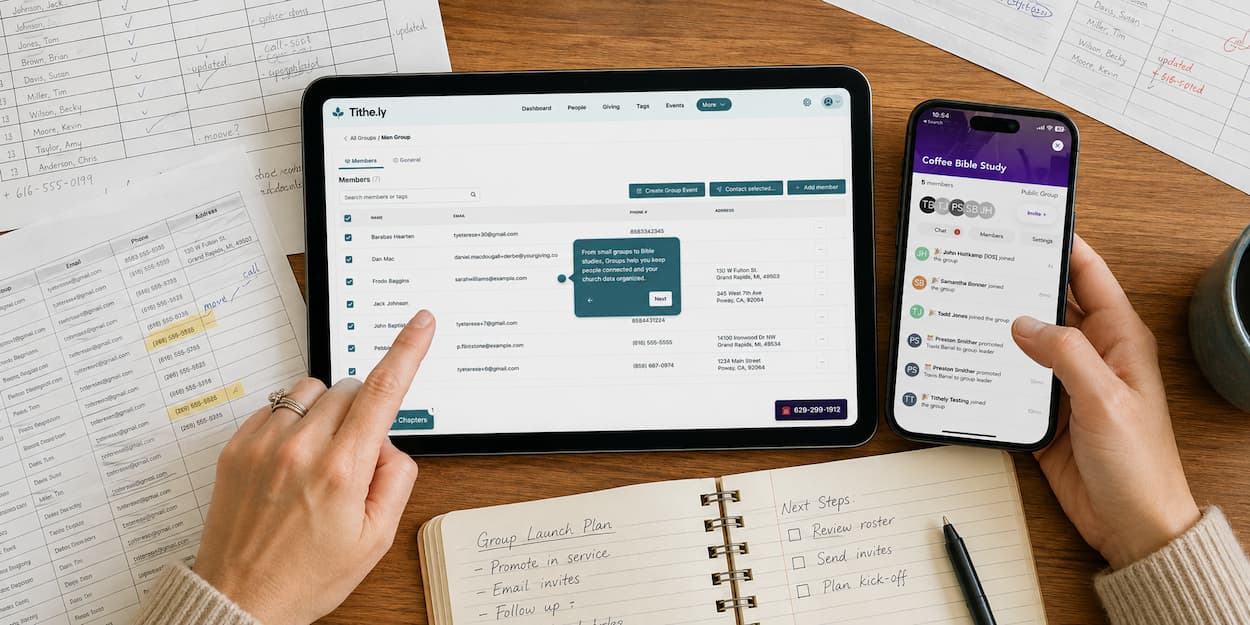



Here's a familiar cycle: someone needs their info updated in your church management software (ChMS). Now you're updating it again somewhere else — a spreadsheet, a group leader's personal list, a second tool nobody quite trusts. Multiply that by every group, every ministry, every season, and you've got an admin's version of whack-a-mole.
Tithely Groups is built to end that cycle. Not by adding another system to keep in sync, but by making sure you only ever have to enter something once.
What you manage is what your congregation sees
Every group lives on its own dedicated tab in your church management dashboard — members, leaders, meeting cadence, location, all in one place. When something changes there, it doesn't just sit updated in your admin view. It flows automatically to Church Apps, so what your congregation sees always matches what you manage.
That sync runs both directions:
- Change a group's members, settings, or details in the ChMS — Church Apps reflects it automatically
- A visitor requests to join from the app — that request flows straight back to the ChMS, no manual entry required
No exporting. No reconciling two versions of a roster. No wondering which list is actually current.
This isn't a second system to manage
To be clear about what this is and isn't: Groups doesn't give you a second database or spreadsheet to maintain. There's one home for this data. Tithely Church Management and Church Apps are two windows into the same information, not two systems you're keeping in step with each other by hand.
That distinction matters, because it's the difference between a feature that adds work and one that removes it.
Less reconciling, more ministry
Every hour you spend re-entering a name, updating a meeting time in three places, or double-checking whether Church Apps caught up with your latest change is an hour not spent on the people those groups exist for.
Groups is designed so that upkeep stops being a task. You update once. Everyone — your team, your leaders, your congregation — sees the same thing.
See how it works
→ Visit the Groups feature page
Sign Up for Product Updates

Tithely provides the tools you need to engage with your church online, stay connected, increase generosity, and simplify the lives of your staff.
With tools like text and email messaging, custom church apps and websites, church management software, digital giving, and so much more… it’s no wonder why over 53,000 churches in 50 countries trust Tithely to help run their church.
Here's a familiar cycle: someone needs their info updated in your church management software (ChMS). Now you're updating it again somewhere else — a spreadsheet, a group leader's personal list, a second tool nobody quite trusts. Multiply that by every group, every ministry, every season, and you've got an admin's version of whack-a-mole.
Tithely Groups is built to end that cycle. Not by adding another system to keep in sync, but by making sure you only ever have to enter something once.
What you manage is what your congregation sees
Every group lives on its own dedicated tab in your church management dashboard — members, leaders, meeting cadence, location, all in one place. When something changes there, it doesn't just sit updated in your admin view. It flows automatically to Church Apps, so what your congregation sees always matches what you manage.
That sync runs both directions:
- Change a group's members, settings, or details in the ChMS — Church Apps reflects it automatically
- A visitor requests to join from the app — that request flows straight back to the ChMS, no manual entry required
No exporting. No reconciling two versions of a roster. No wondering which list is actually current.
This isn't a second system to manage
To be clear about what this is and isn't: Groups doesn't give you a second database or spreadsheet to maintain. There's one home for this data. Tithely Church Management and Church Apps are two windows into the same information, not two systems you're keeping in step with each other by hand.
That distinction matters, because it's the difference between a feature that adds work and one that removes it.
Less reconciling, more ministry
Every hour you spend re-entering a name, updating a meeting time in three places, or double-checking whether Church Apps caught up with your latest change is an hour not spent on the people those groups exist for.
Groups is designed so that upkeep stops being a task. You update once. Everyone — your team, your leaders, your congregation — sees the same thing.
See how it works
→ Visit the Groups feature page
podcast transcript
Tithely provides the tools you need to engage with your church online, stay connected, increase generosity, and simplify the lives of your staff.
With tools like text and email messaging, custom church apps and websites, church management software, digital giving, and so much more… it’s no wonder why over 53,000 churches in 50 countries trust Tithely to help run their church.
Here's a familiar cycle: someone needs their info updated in your church management software (ChMS). Now you're updating it again somewhere else — a spreadsheet, a group leader's personal list, a second tool nobody quite trusts. Multiply that by every group, every ministry, every season, and you've got an admin's version of whack-a-mole.
Tithely Groups is built to end that cycle. Not by adding another system to keep in sync, but by making sure you only ever have to enter something once.
What you manage is what your congregation sees
Every group lives on its own dedicated tab in your church management dashboard — members, leaders, meeting cadence, location, all in one place. When something changes there, it doesn't just sit updated in your admin view. It flows automatically to Church Apps, so what your congregation sees always matches what you manage.
That sync runs both directions:
- Change a group's members, settings, or details in the ChMS — Church Apps reflects it automatically
- A visitor requests to join from the app — that request flows straight back to the ChMS, no manual entry required
No exporting. No reconciling two versions of a roster. No wondering which list is actually current.
This isn't a second system to manage
To be clear about what this is and isn't: Groups doesn't give you a second database or spreadsheet to maintain. There's one home for this data. Tithely Church Management and Church Apps are two windows into the same information, not two systems you're keeping in step with each other by hand.
That distinction matters, because it's the difference between a feature that adds work and one that removes it.
Less reconciling, more ministry
Every hour you spend re-entering a name, updating a meeting time in three places, or double-checking whether Church Apps caught up with your latest change is an hour not spent on the people those groups exist for.
Groups is designed so that upkeep stops being a task. You update once. Everyone — your team, your leaders, your congregation — sees the same thing.
See how it works
→ Visit the Groups feature page
VIDEO transcript
Here's a familiar cycle: someone needs their info updated in your church management software (ChMS). Now you're updating it again somewhere else — a spreadsheet, a group leader's personal list, a second tool nobody quite trusts. Multiply that by every group, every ministry, every season, and you've got an admin's version of whack-a-mole.
Tithely Groups is built to end that cycle. Not by adding another system to keep in sync, but by making sure you only ever have to enter something once.
What you manage is what your congregation sees
Every group lives on its own dedicated tab in your church management dashboard — members, leaders, meeting cadence, location, all in one place. When something changes there, it doesn't just sit updated in your admin view. It flows automatically to Church Apps, so what your congregation sees always matches what you manage.
That sync runs both directions:
- Change a group's members, settings, or details in the ChMS — Church Apps reflects it automatically
- A visitor requests to join from the app — that request flows straight back to the ChMS, no manual entry required
No exporting. No reconciling two versions of a roster. No wondering which list is actually current.
This isn't a second system to manage
To be clear about what this is and isn't: Groups doesn't give you a second database or spreadsheet to maintain. There's one home for this data. Tithely Church Management and Church Apps are two windows into the same information, not two systems you're keeping in step with each other by hand.
That distinction matters, because it's the difference between a feature that adds work and one that removes it.
Less reconciling, more ministry
Every hour you spend re-entering a name, updating a meeting time in three places, or double-checking whether Church Apps caught up with your latest change is an hour not spent on the people those groups exist for.
Groups is designed so that upkeep stops being a task. You update once. Everyone — your team, your leaders, your congregation — sees the same thing.
See how it works
→ Visit the Groups feature page
Sign Up for Product Updates
Tithely provides the tools you need to engage with your church online, stay connected, increase generosity, and simplify the lives of your staff.
With tools like text and email messaging, custom church apps and websites, church management software, digital giving, and so much more… it’s no wonder why over 53,000 churches in 50 countries trust Tithely to help run their church.

You Might Also Like
More Resources

From increasing giving, managing your congregation, and engaging your church, our collection of resources will keep you up-to-date on the latest church and ministry trends.
Free Resources