Turn Your Existing Tags Into Groups in Minutes
Turn existing Breeze tags into fully populated church groups in minutes without rebuilding member lists, exporting spreadsheets, or duplicating data.




You're already the IT department, the events team, and the welcome desk — all in one. So when it comes to organizing your church into groups, you probably didn't start from scratch. You tagged people. By life stage, ministry interest, season — whatever made sense at the time.
The problem is that work usually just sits there. Either you're rebuilding those same lists by hand to actually run a group, or group life is happening out of spreadsheets, texts, and side conversations that never quite sync back to your church management software.
Your tags aren’t the workaround — they’re the head start
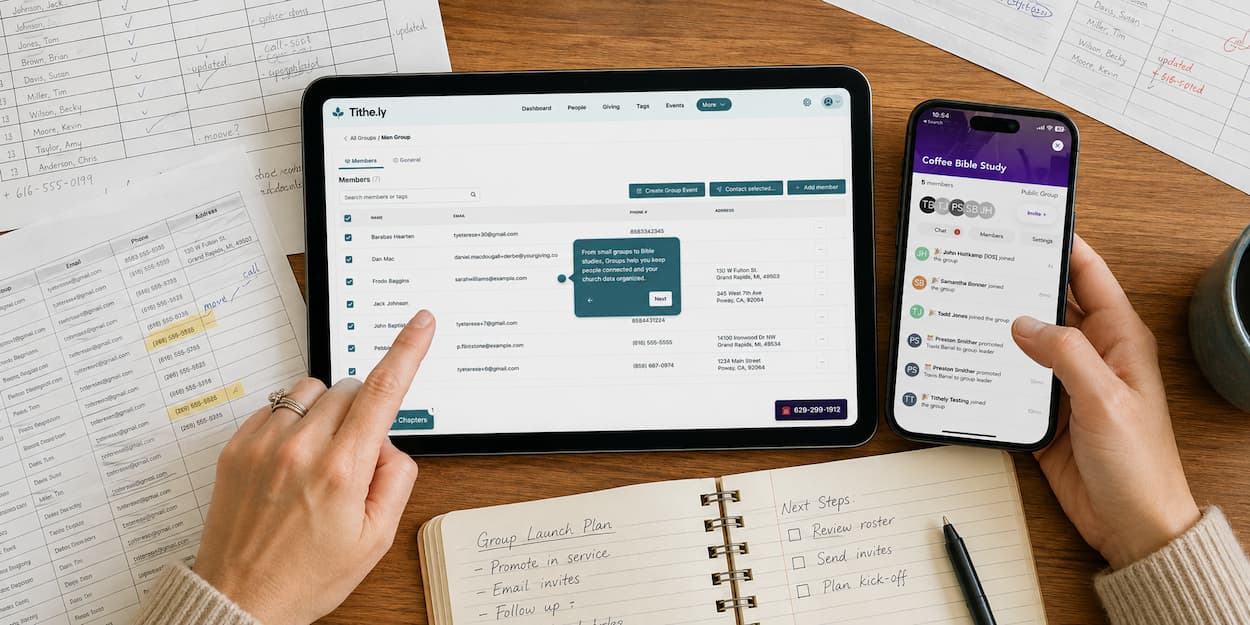
With Tithely Groups, the tagging work you've already done becomes the foundation for a real, functioning group — not a workaround you have to duplicate.
Here's what that looks like in practice:
- Search your existing tags right from the Groups tab
- See member counts before you commit to anything
- Multi-select across tags and preview the combined list
- Create a fully-populated group — members already in place — without rebuilding a single list by hand
No re-tagging people one by one. No exporting a list into a spreadsheet to hand off to a leader. The group shows up ready to go.
A head start no other ChMS can match
If you've used other church management tools, you may have already noticed: this isn't something most of them offer. Bulk tag-to-group creation isn't a workflow competitors currently market — it's specific to how Breeze already handles tagging.
That's not a small thing. It means the more groundwork you've laid in Breeze already, the faster Groups pays off for you specifically.
From scattered tags to an actual group — in the time it takes to read this
Picture the before: a tag with 40 people in it, doing nothing but sitting on a member's profile. And the after: that same 40 people, now a group with a leader, a meeting time, and a home in your church app where they can actually engage with each other.
That's the difference Groups makes; no new data entry, just the data you already have, put to work.
Ready to try it?
Sign Up for Product Updates

Tithely provides the tools you need to engage with your church online, stay connected, increase generosity, and simplify the lives of your staff.
With tools like text and email messaging, custom church apps and websites, church management software, digital giving, and so much more… it’s no wonder why over 53,000 churches in 50 countries trust Tithely to help run their church.
You're already the IT department, the events team, and the welcome desk — all in one. So when it comes to organizing your church into groups, you probably didn't start from scratch. You tagged people. By life stage, ministry interest, season — whatever made sense at the time.
The problem is that work usually just sits there. Either you're rebuilding those same lists by hand to actually run a group, or group life is happening out of spreadsheets, texts, and side conversations that never quite sync back to your church management software.
Your tags aren’t the workaround — they’re the head start
With Tithely Groups, the tagging work you've already done becomes the foundation for a real, functioning group — not a workaround you have to duplicate.
Here's what that looks like in practice:
- Search your existing tags right from the Groups tab
- See member counts before you commit to anything
- Multi-select across tags and preview the combined list
- Create a fully-populated group — members already in place — without rebuilding a single list by hand
No re-tagging people one by one. No exporting a list into a spreadsheet to hand off to a leader. The group shows up ready to go.
A head start no other ChMS can match
If you've used other church management tools, you may have already noticed: this isn't something most of them offer. Bulk tag-to-group creation isn't a workflow competitors currently market — it's specific to how Breeze already handles tagging.
That's not a small thing. It means the more groundwork you've laid in Breeze already, the faster Groups pays off for you specifically.
From scattered tags to an actual group — in the time it takes to read this
Picture the before: a tag with 40 people in it, doing nothing but sitting on a member's profile. And the after: that same 40 people, now a group with a leader, a meeting time, and a home in your church app where they can actually engage with each other.
That's the difference Groups makes; no new data entry, just the data you already have, put to work.
Ready to try it?
podcast transcript
Tithely provides the tools you need to engage with your church online, stay connected, increase generosity, and simplify the lives of your staff.
With tools like text and email messaging, custom church apps and websites, church management software, digital giving, and so much more… it’s no wonder why over 53,000 churches in 50 countries trust Tithely to help run their church.
You're already the IT department, the events team, and the welcome desk — all in one. So when it comes to organizing your church into groups, you probably didn't start from scratch. You tagged people. By life stage, ministry interest, season — whatever made sense at the time.
The problem is that work usually just sits there. Either you're rebuilding those same lists by hand to actually run a group, or group life is happening out of spreadsheets, texts, and side conversations that never quite sync back to your church management software.
Your tags aren’t the workaround — they’re the head start
With Tithely Groups, the tagging work you've already done becomes the foundation for a real, functioning group — not a workaround you have to duplicate.
Here's what that looks like in practice:
- Search your existing tags right from the Groups tab
- See member counts before you commit to anything
- Multi-select across tags and preview the combined list
- Create a fully-populated group — members already in place — without rebuilding a single list by hand
No re-tagging people one by one. No exporting a list into a spreadsheet to hand off to a leader. The group shows up ready to go.
A head start no other ChMS can match
If you've used other church management tools, you may have already noticed: this isn't something most of them offer. Bulk tag-to-group creation isn't a workflow competitors currently market — it's specific to how Breeze already handles tagging.
That's not a small thing. It means the more groundwork you've laid in Breeze already, the faster Groups pays off for you specifically.
From scattered tags to an actual group — in the time it takes to read this
Picture the before: a tag with 40 people in it, doing nothing but sitting on a member's profile. And the after: that same 40 people, now a group with a leader, a meeting time, and a home in your church app where they can actually engage with each other.
That's the difference Groups makes; no new data entry, just the data you already have, put to work.
Ready to try it?
VIDEO transcript
You're already the IT department, the events team, and the welcome desk — all in one. So when it comes to organizing your church into groups, you probably didn't start from scratch. You tagged people. By life stage, ministry interest, season — whatever made sense at the time.
The problem is that work usually just sits there. Either you're rebuilding those same lists by hand to actually run a group, or group life is happening out of spreadsheets, texts, and side conversations that never quite sync back to your church management software.
Your tags aren’t the workaround — they’re the head start
With Tithely Groups, the tagging work you've already done becomes the foundation for a real, functioning group — not a workaround you have to duplicate.
Here's what that looks like in practice:
- Search your existing tags right from the Groups tab
- See member counts before you commit to anything
- Multi-select across tags and preview the combined list
- Create a fully-populated group — members already in place — without rebuilding a single list by hand
No re-tagging people one by one. No exporting a list into a spreadsheet to hand off to a leader. The group shows up ready to go.
A head start no other ChMS can match
If you've used other church management tools, you may have already noticed: this isn't something most of them offer. Bulk tag-to-group creation isn't a workflow competitors currently market — it's specific to how Breeze already handles tagging.
That's not a small thing. It means the more groundwork you've laid in Breeze already, the faster Groups pays off for you specifically.
From scattered tags to an actual group — in the time it takes to read this
Picture the before: a tag with 40 people in it, doing nothing but sitting on a member's profile. And the after: that same 40 people, now a group with a leader, a meeting time, and a home in your church app where they can actually engage with each other.
That's the difference Groups makes; no new data entry, just the data you already have, put to work.
Ready to try it?
Sign Up for Product Updates
Tithely provides the tools you need to engage with your church online, stay connected, increase generosity, and simplify the lives of your staff.
With tools like text and email messaging, custom church apps and websites, church management software, digital giving, and so much more… it’s no wonder why over 53,000 churches in 50 countries trust Tithely to help run their church.

You Might Also Like
More Resources

From increasing giving, managing your congregation, and engaging your church, our collection of resources will keep you up-to-date on the latest church and ministry trends.
Free Resources





.png)