How to Make Your Church Show Up on Google (Especially for Christmas Services)
Millions of people search Google for a church at Christmas—will they find yours? This guide shows you the simple steps that help your church appear in search results when it matters most.




It’s the Christmas season. Maya is feeling especially “Christmassy”. She’s watched all the Hallmark films that feature a cynical city lawyer who discovers the true meaning of Christmas. She’s partaken of the nog and has holiday tunes playing all the time.
But she feels like something’s missing. She hasn’t been to church all year, and yet she wants to attend one. Maybe for the nostalgia. Perhaps she’s lonely. Maybe she’s been neglecting the spiritual part of her life and wants to get back on track. Or maybe she just enjoys lighting candles and singing carols.
So, how does she find a church to attend?
Simple. She fires up the Google machine and searches for something like “church near me” or “Christmas Eve church service.” She’ll choose one of the churches that appear in the search results (more like “church results,” am I right? Anyone? Anyone?).
Annnddd, cut. Scene. Whatever they say in movies.
Here’s the point: you want your church to show up in Google search results, especially around Christmas.
Every Christmas, millions of people look for a church to attend. The first place they look is often Google.
If your church doesn’t show up on Google, you’re missing out on a major opportunity to reach people who need Jesus. Who need hope. Who may not think about God for another 364 days.
This guide will run you through the basics of church search engine optimization (SEO). Don’t worry, church SEO is not nearly as technical as it sounds. You don’t have to be the “tech person” to do it.
With just a few steps, you can dramatically increase the chances of your church showing up in Google Maps and search results.
Why Google My Business Matters for Churches
The starting point for church SEO is your church’s Google My Business (GMB) profile.
When someone searches for a church, Google decides what to show them based on relevance, accuracy, and location. Your Google My Business (GMB) profile gives Google the information it needs to recommend your church to searchers.
Think of your GMB listing as your digital front door. For many people, it’s the first thing they see about your church, even before they land on your website.
Your profile shows details about the church, like:
- Church Name
- Church Address
- Service times
- Website address (URL)
- Phone number
- Reviews
- Photos
- Descriptions
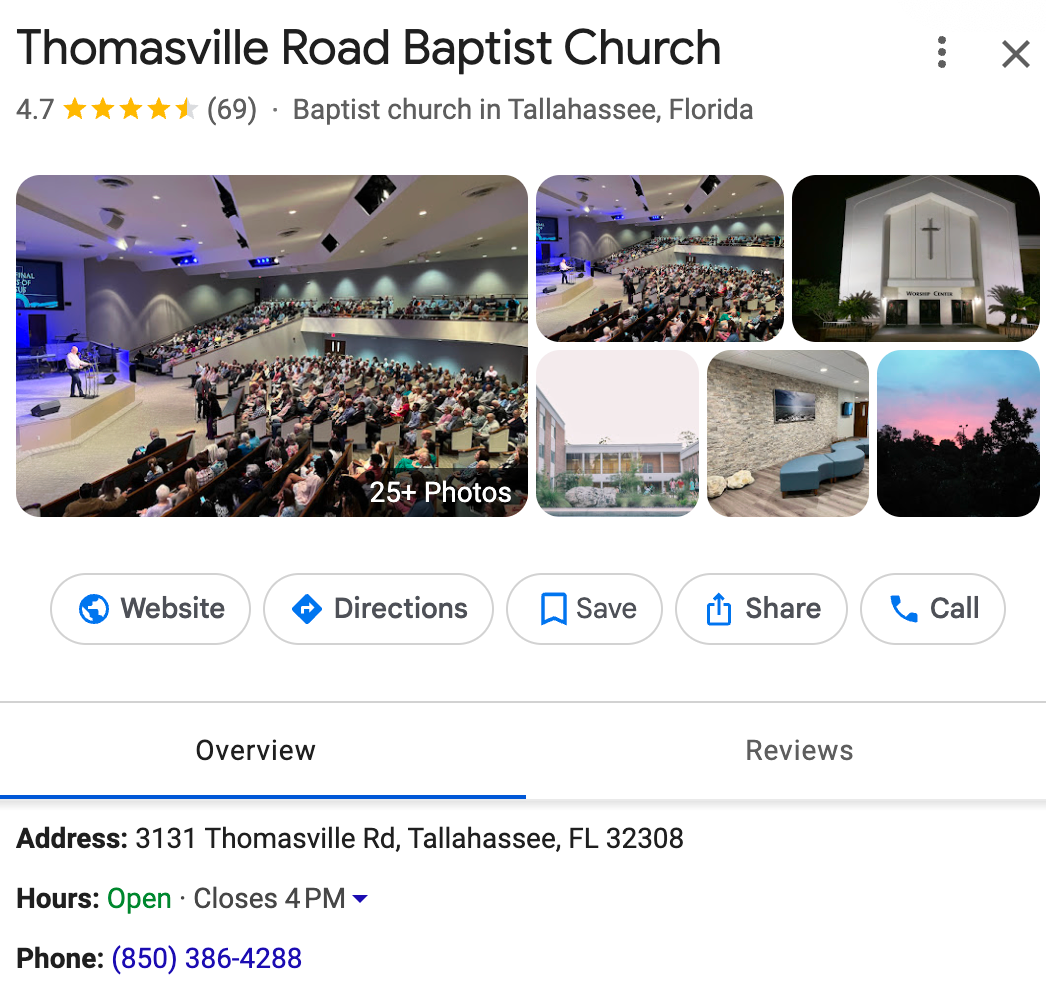
For many first-time guests, this profile shapes their initial impression. Most people who visit a church typically start their search online. They don’t drive around town and look for a church with the most attractive signage or the biggest parking lot.
They search, skim the listings, check reviews, look at photos, and make judgments within seconds. The quality of your GMB profile can be the deciding factor in whether someone attends your church. It’s that important.
A complete and up-to-date Google profile tells people your church is active and welcoming. On the other hand, a profile with a single grainy photo taken 10 years ago will keep people away.
A well-crafted profile also improves your search results ranking because Google prefers organizations that maintain accurate information.
You may have a fantastic website that feels like Apple designed it. But if your GMB profile isn’t active, many people won’t ever see it.
For churches, this matters even more during the Christmas season. Search volume spikes every December as people look for Christmas Eve services. When your profile reflects the correct times, photos, descriptions, and seasonal details, Google is far more likely to show your church to those actively searching.
How to Claim or Update Your Church’s GMB Profile
Before you can optimize anything, you need to own your GMB profile. Google automatically creates listings based on public information, so there’s a good chance one already exists.
Search for your church on Google Maps. If it appears, open the listing and look for a link that says “Own this business” or “Claim this business”.
Once you click it, Google will walk you through a verification process. If there isn’t a profile, you can create one here. Be sure to use a church-related email address, not a personal one, so that multiple staff members can manage it.
Google will send a verification code by mail, email, or text. You will only gain full access to update and optimize your listing after you’re verified.
Once verified, fill out every available section. Google likes and rewards complete profiles.
What to Include in Your Profile
Your Google My Business listing is only as helpful as the information it contains. The more accurate and up-to-date it is, the more likely Google is to show your church to people searching.
Start with the basics: your church name, address, and phone number. Make sure the phone number leads to a reliable voicemail or, ideally, to a real person. People often have questions about service times, childcare, and other matters.
Next, make sure your website link is correct. You’d be surprised how many churches accidentally link to outdated pages.
If possible, link to a page designed specifically for visitors, like a “Plan Your Visit” page. During December, you may want to link directly to a Christmas landing page with service times and details.
Service times are one of the most important pieces of information you can add. They are one of the main things people look for.
Include your regular weekly services, along with any special Christmas or holiday gatherings (such as Advent, Christmas Eve, etc.). As Christmas draws near, add your adjusted hours and event times several weeks in advance so Google has time to index the changes.
Use the description or services areas to highlight your ministries. Write simple, meaningful descriptions about what your church offers, like:
- Kids ministry
- Youth programs
- Food bank
- Small groups
- Counseling
This helps Google match your church to relevant searches, such as “youth group near me” or “church with kids ministry.”
Photos are also essential. Google favors active profiles that regularly upload fresh images.
Choose photos that represent your church and the people who attend, like your:
- Sanctuary (with people in it)
- Lobby (also, with people in it)
- Smiling volunteers
- Kids environments
- Community events
- Baptisms
- Worship services
The photos should give people at least some sense of what to expect when they visit your church. Around Christmas, add seasonal photos that include decorations or a Christmas stage design. Authentic images build trust and help guests imagine what visiting your church might feel like.
For better or worse, reviews are also a determining factor in where your church appears in search results. Churches with lots of positive reviews are usually going to show up higher than churches with just a few or zero reviews.
Encourage your members and regular attendees to consider leaving honest feedback about the church. When someone leaves a review, regardless of whether it’s positive or negative, respond to it. Google sees active engagement as a sign of reliability.
Link to Your Google My Business Profile From Your Website
One simple but often overlooked way to strengthen your church’s visibility in Google search results is to link directly to your Google My Business profile from your website. Adding a small text link—usually in your footer, contact page, or “Plan Your Visit” page—helps Google clearly associate your website with your GMB listing.
This added layer of verification reinforces the accuracy of your church’s information and can improve your local ranking. It also gives visitors an easy way to read reviews, get directions, and see service times right inside Google, which boosts trust and reduces friction for first-time guests looking for a church to attend, especially during the Christmas season.
If your website is outdated or difficult to update, tools like Tithely Sites make it incredibly easy to build a modern, visitor-focused church website that’s optimized for Google from day one.
Additional Tips for Improving Church SEO Beyond GMB
While Google My Business is one of the strongest tools for increasing search visibility, your church website also plays a significant role in church SEO.
Use location-based keywords on your site, especially in your homepage title, your about page, and your visitor pages. Phrases like “church in Dallas,” “Christian church in Seattle,” or “church near downtown Nashville” help Google understand the connection between your church and city.
This is really important because most people search using their city name or the phrase “near me.”
Another strategy is to embed a Google Map on your website. This reinforces Google's understanding of your church's location and strengthens your local ranking.
Create content that is helpful to newcomers, such as visitor guides, ministry info, and a clear statement of faith. Posting fresh content helps Google see your site as active and trustworthy.
Reaching People With Church SEO
The reality is that your place in Google search results can have a significant impact on your ability to reach your community. Don’t think about church SEO as an annoying tech thing that you have to do. Consider it a key strategy for how your church fulfills its mission.
It doesn’t take a considerable time investment to optimize your GMB profile and website. In fact, it has an outsized impact compared to what’s required.
When your church shows up in search results, you have a powerful opportunity to help people hear the message of Jesus and find hope during one of the most meaningful seasons of the year.
It’s amazing what something so banal as a Google profile can help you accomplish. Don’t waste the opportunity.
Sign Up for Product Updates

Stephen Altrogge lives in Tallahassee, Florida. He is a dad to three wonderful girls and has written for publications like The Gospel Coalition, Church Leaders, Crosswalk, and many more. When he’s not writing, you’ll find him reading or watching The Lord Of the Rings for the 10th time.
It’s the Christmas season. Maya is feeling especially “Christmassy”. She’s watched all the Hallmark films that feature a cynical city lawyer who discovers the true meaning of Christmas. She’s partaken of the nog and has holiday tunes playing all the time.
But she feels like something’s missing. She hasn’t been to church all year, and yet she wants to attend one. Maybe for the nostalgia. Perhaps she’s lonely. Maybe she’s been neglecting the spiritual part of her life and wants to get back on track. Or maybe she just enjoys lighting candles and singing carols.
So, how does she find a church to attend?
Simple. She fires up the Google machine and searches for something like “church near me” or “Christmas Eve church service.” She’ll choose one of the churches that appear in the search results (more like “church results,” am I right? Anyone? Anyone?).
Annnddd, cut. Scene. Whatever they say in movies.
Here’s the point: you want your church to show up in Google search results, especially around Christmas.
Every Christmas, millions of people look for a church to attend. The first place they look is often Google.
If your church doesn’t show up on Google, you’re missing out on a major opportunity to reach people who need Jesus. Who need hope. Who may not think about God for another 364 days.
This guide will run you through the basics of church search engine optimization (SEO). Don’t worry, church SEO is not nearly as technical as it sounds. You don’t have to be the “tech person” to do it.
With just a few steps, you can dramatically increase the chances of your church showing up in Google Maps and search results.
Why Google My Business Matters for Churches
The starting point for church SEO is your church’s Google My Business (GMB) profile.
When someone searches for a church, Google decides what to show them based on relevance, accuracy, and location. Your Google My Business (GMB) profile gives Google the information it needs to recommend your church to searchers.
Think of your GMB listing as your digital front door. For many people, it’s the first thing they see about your church, even before they land on your website.
Your profile shows details about the church, like:
- Church Name
- Church Address
- Service times
- Website address (URL)
- Phone number
- Reviews
- Photos
- Descriptions
For many first-time guests, this profile shapes their initial impression. Most people who visit a church typically start their search online. They don’t drive around town and look for a church with the most attractive signage or the biggest parking lot.
They search, skim the listings, check reviews, look at photos, and make judgments within seconds. The quality of your GMB profile can be the deciding factor in whether someone attends your church. It’s that important.
A complete and up-to-date Google profile tells people your church is active and welcoming. On the other hand, a profile with a single grainy photo taken 10 years ago will keep people away.
A well-crafted profile also improves your search results ranking because Google prefers organizations that maintain accurate information.
You may have a fantastic website that feels like Apple designed it. But if your GMB profile isn’t active, many people won’t ever see it.
For churches, this matters even more during the Christmas season. Search volume spikes every December as people look for Christmas Eve services. When your profile reflects the correct times, photos, descriptions, and seasonal details, Google is far more likely to show your church to those actively searching.
How to Claim or Update Your Church’s GMB Profile
Before you can optimize anything, you need to own your GMB profile. Google automatically creates listings based on public information, so there’s a good chance one already exists.
Search for your church on Google Maps. If it appears, open the listing and look for a link that says “Own this business” or “Claim this business”.
Once you click it, Google will walk you through a verification process. If there isn’t a profile, you can create one here. Be sure to use a church-related email address, not a personal one, so that multiple staff members can manage it.
Google will send a verification code by mail, email, or text. You will only gain full access to update and optimize your listing after you’re verified.
Once verified, fill out every available section. Google likes and rewards complete profiles.
What to Include in Your Profile
Your Google My Business listing is only as helpful as the information it contains. The more accurate and up-to-date it is, the more likely Google is to show your church to people searching.
Start with the basics: your church name, address, and phone number. Make sure the phone number leads to a reliable voicemail or, ideally, to a real person. People often have questions about service times, childcare, and other matters.
Next, make sure your website link is correct. You’d be surprised how many churches accidentally link to outdated pages.
If possible, link to a page designed specifically for visitors, like a “Plan Your Visit” page. During December, you may want to link directly to a Christmas landing page with service times and details.
Service times are one of the most important pieces of information you can add. They are one of the main things people look for.
Include your regular weekly services, along with any special Christmas or holiday gatherings (such as Advent, Christmas Eve, etc.). As Christmas draws near, add your adjusted hours and event times several weeks in advance so Google has time to index the changes.
Use the description or services areas to highlight your ministries. Write simple, meaningful descriptions about what your church offers, like:
- Kids ministry
- Youth programs
- Food bank
- Small groups
- Counseling
This helps Google match your church to relevant searches, such as “youth group near me” or “church with kids ministry.”
Photos are also essential. Google favors active profiles that regularly upload fresh images.
Choose photos that represent your church and the people who attend, like your:
- Sanctuary (with people in it)
- Lobby (also, with people in it)
- Smiling volunteers
- Kids environments
- Community events
- Baptisms
- Worship services
The photos should give people at least some sense of what to expect when they visit your church. Around Christmas, add seasonal photos that include decorations or a Christmas stage design. Authentic images build trust and help guests imagine what visiting your church might feel like.
For better or worse, reviews are also a determining factor in where your church appears in search results. Churches with lots of positive reviews are usually going to show up higher than churches with just a few or zero reviews.
Encourage your members and regular attendees to consider leaving honest feedback about the church. When someone leaves a review, regardless of whether it’s positive or negative, respond to it. Google sees active engagement as a sign of reliability.
Link to Your Google My Business Profile From Your Website
One simple but often overlooked way to strengthen your church’s visibility in Google search results is to link directly to your Google My Business profile from your website. Adding a small text link—usually in your footer, contact page, or “Plan Your Visit” page—helps Google clearly associate your website with your GMB listing.
This added layer of verification reinforces the accuracy of your church’s information and can improve your local ranking. It also gives visitors an easy way to read reviews, get directions, and see service times right inside Google, which boosts trust and reduces friction for first-time guests looking for a church to attend, especially during the Christmas season.
If your website is outdated or difficult to update, tools like Tithely Sites make it incredibly easy to build a modern, visitor-focused church website that’s optimized for Google from day one.
Additional Tips for Improving Church SEO Beyond GMB
While Google My Business is one of the strongest tools for increasing search visibility, your church website also plays a significant role in church SEO.
Use location-based keywords on your site, especially in your homepage title, your about page, and your visitor pages. Phrases like “church in Dallas,” “Christian church in Seattle,” or “church near downtown Nashville” help Google understand the connection between your church and city.
This is really important because most people search using their city name or the phrase “near me.”
Another strategy is to embed a Google Map on your website. This reinforces Google's understanding of your church's location and strengthens your local ranking.
Create content that is helpful to newcomers, such as visitor guides, ministry info, and a clear statement of faith. Posting fresh content helps Google see your site as active and trustworthy.
Reaching People With Church SEO
The reality is that your place in Google search results can have a significant impact on your ability to reach your community. Don’t think about church SEO as an annoying tech thing that you have to do. Consider it a key strategy for how your church fulfills its mission.
It doesn’t take a considerable time investment to optimize your GMB profile and website. In fact, it has an outsized impact compared to what’s required.
When your church shows up in search results, you have a powerful opportunity to help people hear the message of Jesus and find hope during one of the most meaningful seasons of the year.
It’s amazing what something so banal as a Google profile can help you accomplish. Don’t waste the opportunity.
podcast transcript
Stephen Altrogge lives in Tallahassee, Florida. He is a dad to three wonderful girls and has written for publications like The Gospel Coalition, Church Leaders, Crosswalk, and many more. When he’s not writing, you’ll find him reading or watching The Lord Of the Rings for the 10th time.
It’s the Christmas season. Maya is feeling especially “Christmassy”. She’s watched all the Hallmark films that feature a cynical city lawyer who discovers the true meaning of Christmas. She’s partaken of the nog and has holiday tunes playing all the time.
But she feels like something’s missing. She hasn’t been to church all year, and yet she wants to attend one. Maybe for the nostalgia. Perhaps she’s lonely. Maybe she’s been neglecting the spiritual part of her life and wants to get back on track. Or maybe she just enjoys lighting candles and singing carols.
So, how does she find a church to attend?
Simple. She fires up the Google machine and searches for something like “church near me” or “Christmas Eve church service.” She’ll choose one of the churches that appear in the search results (more like “church results,” am I right? Anyone? Anyone?).
Annnddd, cut. Scene. Whatever they say in movies.
Here’s the point: you want your church to show up in Google search results, especially around Christmas.
Every Christmas, millions of people look for a church to attend. The first place they look is often Google.
If your church doesn’t show up on Google, you’re missing out on a major opportunity to reach people who need Jesus. Who need hope. Who may not think about God for another 364 days.
This guide will run you through the basics of church search engine optimization (SEO). Don’t worry, church SEO is not nearly as technical as it sounds. You don’t have to be the “tech person” to do it.
With just a few steps, you can dramatically increase the chances of your church showing up in Google Maps and search results.
Why Google My Business Matters for Churches
The starting point for church SEO is your church’s Google My Business (GMB) profile.
When someone searches for a church, Google decides what to show them based on relevance, accuracy, and location. Your Google My Business (GMB) profile gives Google the information it needs to recommend your church to searchers.
Think of your GMB listing as your digital front door. For many people, it’s the first thing they see about your church, even before they land on your website.
Your profile shows details about the church, like:
- Church Name
- Church Address
- Service times
- Website address (URL)
- Phone number
- Reviews
- Photos
- Descriptions
For many first-time guests, this profile shapes their initial impression. Most people who visit a church typically start their search online. They don’t drive around town and look for a church with the most attractive signage or the biggest parking lot.
They search, skim the listings, check reviews, look at photos, and make judgments within seconds. The quality of your GMB profile can be the deciding factor in whether someone attends your church. It’s that important.
A complete and up-to-date Google profile tells people your church is active and welcoming. On the other hand, a profile with a single grainy photo taken 10 years ago will keep people away.
A well-crafted profile also improves your search results ranking because Google prefers organizations that maintain accurate information.
You may have a fantastic website that feels like Apple designed it. But if your GMB profile isn’t active, many people won’t ever see it.
For churches, this matters even more during the Christmas season. Search volume spikes every December as people look for Christmas Eve services. When your profile reflects the correct times, photos, descriptions, and seasonal details, Google is far more likely to show your church to those actively searching.
How to Claim or Update Your Church’s GMB Profile
Before you can optimize anything, you need to own your GMB profile. Google automatically creates listings based on public information, so there’s a good chance one already exists.
Search for your church on Google Maps. If it appears, open the listing and look for a link that says “Own this business” or “Claim this business”.
Once you click it, Google will walk you through a verification process. If there isn’t a profile, you can create one here. Be sure to use a church-related email address, not a personal one, so that multiple staff members can manage it.
Google will send a verification code by mail, email, or text. You will only gain full access to update and optimize your listing after you’re verified.
Once verified, fill out every available section. Google likes and rewards complete profiles.
What to Include in Your Profile
Your Google My Business listing is only as helpful as the information it contains. The more accurate and up-to-date it is, the more likely Google is to show your church to people searching.
Start with the basics: your church name, address, and phone number. Make sure the phone number leads to a reliable voicemail or, ideally, to a real person. People often have questions about service times, childcare, and other matters.
Next, make sure your website link is correct. You’d be surprised how many churches accidentally link to outdated pages.
If possible, link to a page designed specifically for visitors, like a “Plan Your Visit” page. During December, you may want to link directly to a Christmas landing page with service times and details.
Service times are one of the most important pieces of information you can add. They are one of the main things people look for.
Include your regular weekly services, along with any special Christmas or holiday gatherings (such as Advent, Christmas Eve, etc.). As Christmas draws near, add your adjusted hours and event times several weeks in advance so Google has time to index the changes.
Use the description or services areas to highlight your ministries. Write simple, meaningful descriptions about what your church offers, like:
- Kids ministry
- Youth programs
- Food bank
- Small groups
- Counseling
This helps Google match your church to relevant searches, such as “youth group near me” or “church with kids ministry.”
Photos are also essential. Google favors active profiles that regularly upload fresh images.
Choose photos that represent your church and the people who attend, like your:
- Sanctuary (with people in it)
- Lobby (also, with people in it)
- Smiling volunteers
- Kids environments
- Community events
- Baptisms
- Worship services
The photos should give people at least some sense of what to expect when they visit your church. Around Christmas, add seasonal photos that include decorations or a Christmas stage design. Authentic images build trust and help guests imagine what visiting your church might feel like.
For better or worse, reviews are also a determining factor in where your church appears in search results. Churches with lots of positive reviews are usually going to show up higher than churches with just a few or zero reviews.
Encourage your members and regular attendees to consider leaving honest feedback about the church. When someone leaves a review, regardless of whether it’s positive or negative, respond to it. Google sees active engagement as a sign of reliability.
Link to Your Google My Business Profile From Your Website
One simple but often overlooked way to strengthen your church’s visibility in Google search results is to link directly to your Google My Business profile from your website. Adding a small text link—usually in your footer, contact page, or “Plan Your Visit” page—helps Google clearly associate your website with your GMB listing.
This added layer of verification reinforces the accuracy of your church’s information and can improve your local ranking. It also gives visitors an easy way to read reviews, get directions, and see service times right inside Google, which boosts trust and reduces friction for first-time guests looking for a church to attend, especially during the Christmas season.
If your website is outdated or difficult to update, tools like Tithely Sites make it incredibly easy to build a modern, visitor-focused church website that’s optimized for Google from day one.
Additional Tips for Improving Church SEO Beyond GMB
While Google My Business is one of the strongest tools for increasing search visibility, your church website also plays a significant role in church SEO.
Use location-based keywords on your site, especially in your homepage title, your about page, and your visitor pages. Phrases like “church in Dallas,” “Christian church in Seattle,” or “church near downtown Nashville” help Google understand the connection between your church and city.
This is really important because most people search using their city name or the phrase “near me.”
Another strategy is to embed a Google Map on your website. This reinforces Google's understanding of your church's location and strengthens your local ranking.
Create content that is helpful to newcomers, such as visitor guides, ministry info, and a clear statement of faith. Posting fresh content helps Google see your site as active and trustworthy.
Reaching People With Church SEO
The reality is that your place in Google search results can have a significant impact on your ability to reach your community. Don’t think about church SEO as an annoying tech thing that you have to do. Consider it a key strategy for how your church fulfills its mission.
It doesn’t take a considerable time investment to optimize your GMB profile and website. In fact, it has an outsized impact compared to what’s required.
When your church shows up in search results, you have a powerful opportunity to help people hear the message of Jesus and find hope during one of the most meaningful seasons of the year.
It’s amazing what something so banal as a Google profile can help you accomplish. Don’t waste the opportunity.
VIDEO transcript
It’s the Christmas season. Maya is feeling especially “Christmassy”. She’s watched all the Hallmark films that feature a cynical city lawyer who discovers the true meaning of Christmas. She’s partaken of the nog and has holiday tunes playing all the time.
But she feels like something’s missing. She hasn’t been to church all year, and yet she wants to attend one. Maybe for the nostalgia. Perhaps she’s lonely. Maybe she’s been neglecting the spiritual part of her life and wants to get back on track. Or maybe she just enjoys lighting candles and singing carols.
So, how does she find a church to attend?
Simple. She fires up the Google machine and searches for something like “church near me” or “Christmas Eve church service.” She’ll choose one of the churches that appear in the search results (more like “church results,” am I right? Anyone? Anyone?).
Annnddd, cut. Scene. Whatever they say in movies.
Here’s the point: you want your church to show up in Google search results, especially around Christmas.
Every Christmas, millions of people look for a church to attend. The first place they look is often Google.
If your church doesn’t show up on Google, you’re missing out on a major opportunity to reach people who need Jesus. Who need hope. Who may not think about God for another 364 days.
This guide will run you through the basics of church search engine optimization (SEO). Don’t worry, church SEO is not nearly as technical as it sounds. You don’t have to be the “tech person” to do it.
With just a few steps, you can dramatically increase the chances of your church showing up in Google Maps and search results.
Why Google My Business Matters for Churches
The starting point for church SEO is your church’s Google My Business (GMB) profile.
When someone searches for a church, Google decides what to show them based on relevance, accuracy, and location. Your Google My Business (GMB) profile gives Google the information it needs to recommend your church to searchers.
Think of your GMB listing as your digital front door. For many people, it’s the first thing they see about your church, even before they land on your website.
Your profile shows details about the church, like:
- Church Name
- Church Address
- Service times
- Website address (URL)
- Phone number
- Reviews
- Photos
- Descriptions
For many first-time guests, this profile shapes their initial impression. Most people who visit a church typically start their search online. They don’t drive around town and look for a church with the most attractive signage or the biggest parking lot.
They search, skim the listings, check reviews, look at photos, and make judgments within seconds. The quality of your GMB profile can be the deciding factor in whether someone attends your church. It’s that important.
A complete and up-to-date Google profile tells people your church is active and welcoming. On the other hand, a profile with a single grainy photo taken 10 years ago will keep people away.
A well-crafted profile also improves your search results ranking because Google prefers organizations that maintain accurate information.
You may have a fantastic website that feels like Apple designed it. But if your GMB profile isn’t active, many people won’t ever see it.
For churches, this matters even more during the Christmas season. Search volume spikes every December as people look for Christmas Eve services. When your profile reflects the correct times, photos, descriptions, and seasonal details, Google is far more likely to show your church to those actively searching.
How to Claim or Update Your Church’s GMB Profile
Before you can optimize anything, you need to own your GMB profile. Google automatically creates listings based on public information, so there’s a good chance one already exists.
Search for your church on Google Maps. If it appears, open the listing and look for a link that says “Own this business” or “Claim this business”.
Once you click it, Google will walk you through a verification process. If there isn’t a profile, you can create one here. Be sure to use a church-related email address, not a personal one, so that multiple staff members can manage it.
Google will send a verification code by mail, email, or text. You will only gain full access to update and optimize your listing after you’re verified.
Once verified, fill out every available section. Google likes and rewards complete profiles.
What to Include in Your Profile
Your Google My Business listing is only as helpful as the information it contains. The more accurate and up-to-date it is, the more likely Google is to show your church to people searching.
Start with the basics: your church name, address, and phone number. Make sure the phone number leads to a reliable voicemail or, ideally, to a real person. People often have questions about service times, childcare, and other matters.
Next, make sure your website link is correct. You’d be surprised how many churches accidentally link to outdated pages.
If possible, link to a page designed specifically for visitors, like a “Plan Your Visit” page. During December, you may want to link directly to a Christmas landing page with service times and details.
Service times are one of the most important pieces of information you can add. They are one of the main things people look for.
Include your regular weekly services, along with any special Christmas or holiday gatherings (such as Advent, Christmas Eve, etc.). As Christmas draws near, add your adjusted hours and event times several weeks in advance so Google has time to index the changes.
Use the description or services areas to highlight your ministries. Write simple, meaningful descriptions about what your church offers, like:
- Kids ministry
- Youth programs
- Food bank
- Small groups
- Counseling
This helps Google match your church to relevant searches, such as “youth group near me” or “church with kids ministry.”
Photos are also essential. Google favors active profiles that regularly upload fresh images.
Choose photos that represent your church and the people who attend, like your:
- Sanctuary (with people in it)
- Lobby (also, with people in it)
- Smiling volunteers
- Kids environments
- Community events
- Baptisms
- Worship services
The photos should give people at least some sense of what to expect when they visit your church. Around Christmas, add seasonal photos that include decorations or a Christmas stage design. Authentic images build trust and help guests imagine what visiting your church might feel like.
For better or worse, reviews are also a determining factor in where your church appears in search results. Churches with lots of positive reviews are usually going to show up higher than churches with just a few or zero reviews.
Encourage your members and regular attendees to consider leaving honest feedback about the church. When someone leaves a review, regardless of whether it’s positive or negative, respond to it. Google sees active engagement as a sign of reliability.
Link to Your Google My Business Profile From Your Website
One simple but often overlooked way to strengthen your church’s visibility in Google search results is to link directly to your Google My Business profile from your website. Adding a small text link—usually in your footer, contact page, or “Plan Your Visit” page—helps Google clearly associate your website with your GMB listing.
This added layer of verification reinforces the accuracy of your church’s information and can improve your local ranking. It also gives visitors an easy way to read reviews, get directions, and see service times right inside Google, which boosts trust and reduces friction for first-time guests looking for a church to attend, especially during the Christmas season.
If your website is outdated or difficult to update, tools like Tithely Sites make it incredibly easy to build a modern, visitor-focused church website that’s optimized for Google from day one.
Additional Tips for Improving Church SEO Beyond GMB
While Google My Business is one of the strongest tools for increasing search visibility, your church website also plays a significant role in church SEO.
Use location-based keywords on your site, especially in your homepage title, your about page, and your visitor pages. Phrases like “church in Dallas,” “Christian church in Seattle,” or “church near downtown Nashville” help Google understand the connection between your church and city.
This is really important because most people search using their city name or the phrase “near me.”
Another strategy is to embed a Google Map on your website. This reinforces Google's understanding of your church's location and strengthens your local ranking.
Create content that is helpful to newcomers, such as visitor guides, ministry info, and a clear statement of faith. Posting fresh content helps Google see your site as active and trustworthy.
Reaching People With Church SEO
The reality is that your place in Google search results can have a significant impact on your ability to reach your community. Don’t think about church SEO as an annoying tech thing that you have to do. Consider it a key strategy for how your church fulfills its mission.
It doesn’t take a considerable time investment to optimize your GMB profile and website. In fact, it has an outsized impact compared to what’s required.
When your church shows up in search results, you have a powerful opportunity to help people hear the message of Jesus and find hope during one of the most meaningful seasons of the year.
It’s amazing what something so banal as a Google profile can help you accomplish. Don’t waste the opportunity.
Sign Up for Product Updates
Stephen Altrogge lives in Tallahassee, Florida. He is a dad to three wonderful girls and has written for publications like The Gospel Coalition, Church Leaders, Crosswalk, and many more. When he’s not writing, you’ll find him reading or watching The Lord Of the Rings for the 10th time.

You Might Also Like
More Resources

From increasing giving, managing your congregation, and engaging your church, our collection of resources will keep you up-to-date on the latest church and ministry trends.
Free Resources.jpg)


.jpg)