How Churches Manage Members Without Chasing Paper Forms
Managing church members with paper forms and spreadsheets becomes increasingly difficult as churches grow. Discover how a Church Management System (ChMS) helps churches centralize member records, improve communication, track engagement, and create consistent follow-up processes that support better pastoral care.
.jpg)



Eventually, every growing church reaches a point when things start to break. Not all at once. Just one “small” thing after another.
Connection cards pile up. Volunteer sheets get misplaced. Someone promises to enter the data later, but later rarely comes. Meanwhile, new families wait to be contacted, ministry leaders lack key details, and staff spend valuable time tracking information rather than caring for people.
So, how do growing churches manage their members effectively? It’s not that they’re better at paperwork.
Rather, they’ve replaced scattered processes with a church software tool, such as a Church Management System (ChMS), which is an online database that stores people’s information, tracks engagement, and supports follow-up.
Let’s look at how churches manage members with a ChMS.
Why Paper and Spreadsheets Break Down
We’ve touched on this, but it’s worth exploring more.
Paper forms and church member spreadsheets can work when a church is small, but they quickly create problems as more people become involved.
Information becomes scattered across connection cards, children’s check-in sheets, volunteer lists, and group rosters. Data gets entered more than once. Contact details become outdated. Follow-up depends on someone remembering, rather than a system prompting action.
This creates a big problem and a bigger problem:
- Administrative frustration
- Missed opportunities to care for people
A Church Management System replaces fragmented lists with one organized system.
What a Church Management System Actually Does
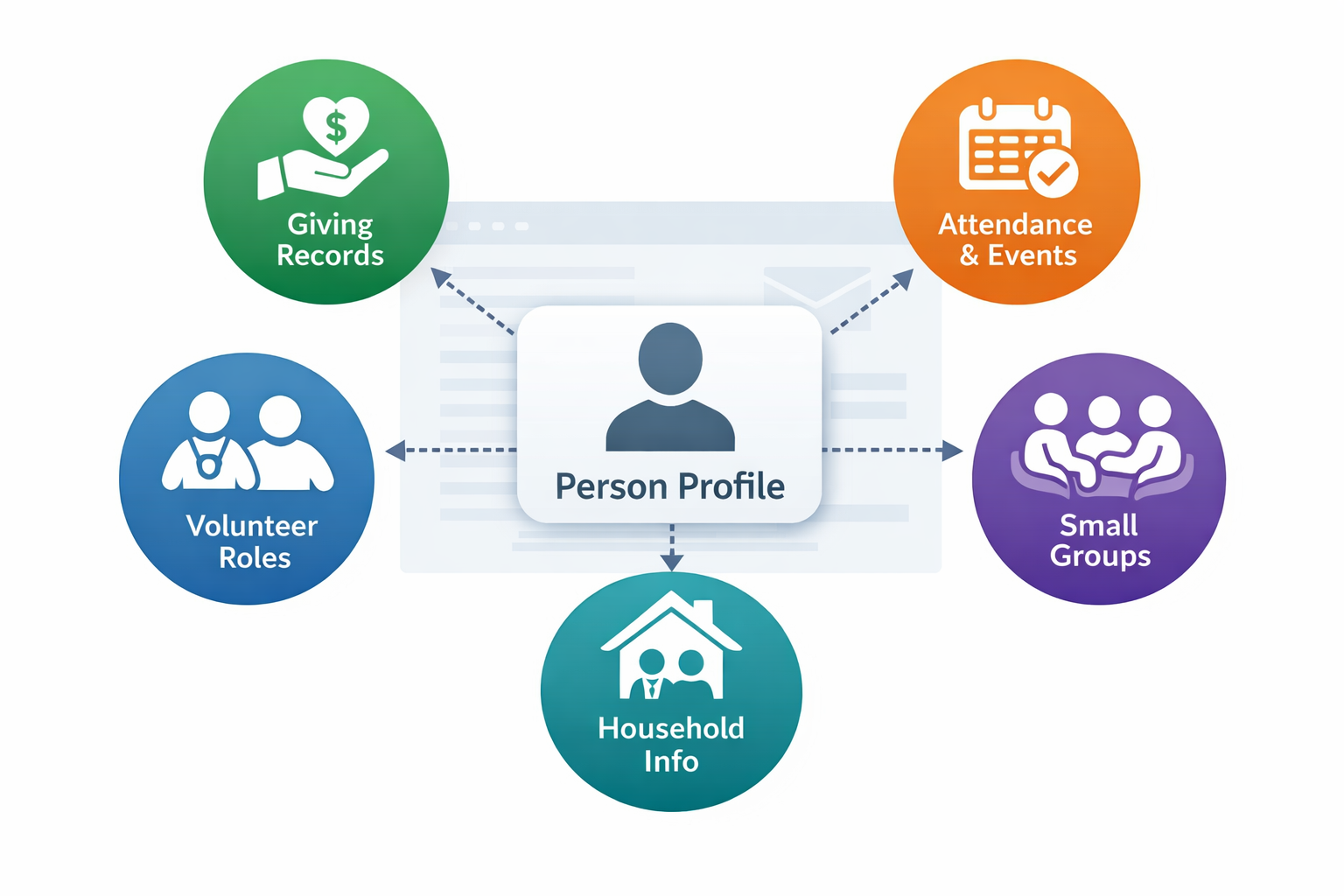
A ChMS is a central people database designed specifically for churches. Instead of separate spreadsheets for attendance, volunteers, giving, and groups, every person has a single profile that connects to all their church involvement.
The profile holds basic identity and contact information. All of their related activity records are connected to that primary profile. Giving history, event participation, group involvement, and serving roles are linked to a single profile rather than stored in separate spreadsheets.
For example, Tithely ChMS has software for giving, event registration, small groups, and more. If a person donates, they are recorded in the giving module, and the record can be easily connected back to the person’s primary profile.
Everything stays connected. Everything stays organized.
And you can see the full picture of a person’s journey while keeping information organized and accessible.
How Churches Manage Members Effectively With a ChMS
What does a ChMS look like in practice? Here are the steps you would follow if you used one in your church.
Step 1: Capture Information Once
A ChMS allows churches to collect information digitally, so it never needs to be retyped.
Guests can connect through a mobile form, text link, QR code, or welcome desk tablet. When they submit their information, a person profile is created automatically.
For example, a guest scans the QR code on the seatback and fills out the connect form before the message even begins. By the time the service ends, their profile exists in the system, they’ve received a welcome message, and your follow-up team already knows to reach out.
This eliminates handwriting errors, duplicate entries, and lost connection cards while ensuring information is immediately usable.
Short, simple forms encourage completion and improve accuracy.
Step 2: Store People in One Central Record
A ChMS creates one profile per person, which serves as the central record across the church.
Additional information connects to that profile rather than existing in isolated spreadsheets:
- Giving records
- Attendance and event participation
- Volunteer roles
- Small group participation
- Household relationships
This keeps records clean while providing a complete picture of involvement.
It looks kind of like this:
Here’s what this might look like in action:
On Monday morning, the church administrator opens the ChMS and sees a list of new guests from Sunday. One of them is Maria Hernandez.
Her profile already includes her contact information and shows that two children were checked in at the kids' desk. The system also shows Maria marked interest in small groups, prompting the groups coordinator to follow up.
Over the next few weeks, Maria joins a small group and begins serving on the welcome team. Each step is added to her existing profile.
When she later gives online, her giving history is recorded. Because giving records are linked to each person’s profile, leaders can see how churches track donations accurately without maintaining separate spreadsheets.
Step 3: Track Engagement and Connection
A ChMS helps churches understand where people are in their spiritual journey.
Instead of guessing who is new or disconnected, leaders can see engagement patterns, including first-time guests, regular attenders, group participants, volunteers, and members.
For example, by viewing a person’s small group participation, service involvement, and attendance patterns, leaders can quickly understand how connected someone is.
A person attending regularly but not in a group may be ready for the next step. A volunteer who has stopped serving may need follow-up. A first-time guest who hasn’t returned may need a personal invitation.
Clear visibility leads to intentional care.
Step 4: Build Consistent Follow-Up
One of the biggest advantages of a ChMS is structured follow-up.
When someone fills out a connect form, the system can flag them as new and prompt follow-up. Automated thank-you messages can be sent immediately, and team members can see who needs personal contact.
Follow-up isn’t limited to new guests. When someone signs up to volunteer for an upcoming event, the system can confirm their registration immediately and notify the team leader.
As the event approaches, volunteers can receive reminders with arrival times and responsibilities. After the event, a thank-you message can be sent automatically, and leaders can follow up with those who expressed interest in serving again.
Automatic follow-up removes reliance on memory and ensures no one slips through the cracks.
Step 5: Support Ministries Without Creating Duplicate Records
Different ministries need different kinds of information. Children’s ministry needs allergy and pickup details. Small group leaders need communication tools. Volunteer coordinators need serving schedules. Finance teams need giving records.
Without a central system, each ministry often builds its own list, which leads to duplicates, outdated contact details, and inconsistent communication.
A Church Management System keeps one person's profile as the central identity record. Ministry-specific information appears in that profile rather than creating completely unconnected records in separate spreadsheets.
Step 6: Keep Information Accurate Over Time
People move, change phone numbers, join new ministries, and grow in involvement. A ChMS allows updates to occur in one place, keeping information consistent across the church.
Instead of correcting multiple spreadsheets, staff updates a single profile, and the changes apply everywhere.
Accurate information builds trust in the system and confidence in communication.
What Changes When a Church Implements a ChMS
When churches move to a centralized system, several improvements happen quickly:
- Capture once, use everywhere: Information entered one time is available across ministries without retyping or duplication.
- Consistent follow-up: Automated reminders and shared workflows ensure no one is overlooked.
- Elimination of duplicate records: One profile per person prevents conflicting or outdated information.
- Clear engagement visibility: Leaders can see who is new, connected, serving, or drifting.
- More accurate communication: Messages reach the right people using up-to-date contact information.
- Less administrative busywork: Staff spend less time organizing data and more time serving people.
Most importantly, people feel known and cared for rather than processed.
Choosing a System That Fits Your Church
Moving away from paper and scattered spreadsheets doesn’t have to happen all at once. Many churches start by improving how they organize and follow up with people, then expand their systems as needs grow.
If your church wants a simple way to centralize contact information, track engagement, and follow up more consistently, Tithely People offers a completely free practical first step. It helps you keep everyone in one place, reduce duplicate records, and make sure no one slips through the cracks.
As your church grows, you may want more robust tools for areas such as giving, events, check-in, and reporting. That’s where the full Tithely Church Management System comes in, connecting every part of church life into one unified platform.
Instead of juggling paper and spreadsheets, your team can move forward at a comfortable pace while building a system that supports better care and clearer organization.
The Real Goal: Better Care and Stronger Connection
Managing members is ultimately about caring for people well. Accurate records matter because they help churches notice needs, follow up thoughtfully, and support each person’s next step.
When information is centralized and follow-up is consistent, guests feel welcome, volunteers feel supported, and leaders can focus on ministry rather than paperwork. Communication improves, needs are seen sooner, and engagement becomes easier to nurture.
If your church feels buried in forms and spreadsheets, moving to a system designed for how churches actually care for people can bring clarity and relief. With the right software in place, your team spends less time managing information and more time building relationships.
If you want to organize your people in one place, sign up for a free Tithely People account today.
Sign Up for Product Updates

Stephen Altrogge lives in Tallahassee, Florida. He is a dad to three wonderful girls and has written for publications like The Gospel Coalition, Church Leaders, Crosswalk, and many more. When he’s not writing, you’ll find him reading or watching The Lord Of the Rings for the 10th time.
Eventually, every growing church reaches a point when things start to break. Not all at once. Just one “small” thing after another.
Connection cards pile up. Volunteer sheets get misplaced. Someone promises to enter the data later, but later rarely comes. Meanwhile, new families wait to be contacted, ministry leaders lack key details, and staff spend valuable time tracking information rather than caring for people.
So, how do growing churches manage their members effectively? It’s not that they’re better at paperwork.
Rather, they’ve replaced scattered processes with a church software tool, such as a Church Management System (ChMS), which is an online database that stores people’s information, tracks engagement, and supports follow-up.
Let’s look at how churches manage members with a ChMS.
Why Paper and Spreadsheets Break Down
We’ve touched on this, but it’s worth exploring more.
Paper forms and church member spreadsheets can work when a church is small, but they quickly create problems as more people become involved.
Information becomes scattered across connection cards, children’s check-in sheets, volunteer lists, and group rosters. Data gets entered more than once. Contact details become outdated. Follow-up depends on someone remembering, rather than a system prompting action.
This creates a big problem and a bigger problem:
- Administrative frustration
- Missed opportunities to care for people
A Church Management System replaces fragmented lists with one organized system.
What a Church Management System Actually Does
A ChMS is a central people database designed specifically for churches. Instead of separate spreadsheets for attendance, volunteers, giving, and groups, every person has a single profile that connects to all their church involvement.
The profile holds basic identity and contact information. All of their related activity records are connected to that primary profile. Giving history, event participation, group involvement, and serving roles are linked to a single profile rather than stored in separate spreadsheets.
For example, Tithely ChMS has software for giving, event registration, small groups, and more. If a person donates, they are recorded in the giving module, and the record can be easily connected back to the person’s primary profile.
Everything stays connected. Everything stays organized.
And you can see the full picture of a person’s journey while keeping information organized and accessible.
How Churches Manage Members Effectively With a ChMS
What does a ChMS look like in practice? Here are the steps you would follow if you used one in your church.
Step 1: Capture Information Once
A ChMS allows churches to collect information digitally, so it never needs to be retyped.
Guests can connect through a mobile form, text link, QR code, or welcome desk tablet. When they submit their information, a person profile is created automatically.
For example, a guest scans the QR code on the seatback and fills out the connect form before the message even begins. By the time the service ends, their profile exists in the system, they’ve received a welcome message, and your follow-up team already knows to reach out.
This eliminates handwriting errors, duplicate entries, and lost connection cards while ensuring information is immediately usable.
Short, simple forms encourage completion and improve accuracy.
Step 2: Store People in One Central Record
A ChMS creates one profile per person, which serves as the central record across the church.
Additional information connects to that profile rather than existing in isolated spreadsheets:
- Giving records
- Attendance and event participation
- Volunteer roles
- Small group participation
- Household relationships
This keeps records clean while providing a complete picture of involvement.
It looks kind of like this:
Here’s what this might look like in action:
On Monday morning, the church administrator opens the ChMS and sees a list of new guests from Sunday. One of them is Maria Hernandez.
Her profile already includes her contact information and shows that two children were checked in at the kids' desk. The system also shows Maria marked interest in small groups, prompting the groups coordinator to follow up.
Over the next few weeks, Maria joins a small group and begins serving on the welcome team. Each step is added to her existing profile.
When she later gives online, her giving history is recorded. Because giving records are linked to each person’s profile, leaders can see how churches track donations accurately without maintaining separate spreadsheets.
Step 3: Track Engagement and Connection
A ChMS helps churches understand where people are in their spiritual journey.
Instead of guessing who is new or disconnected, leaders can see engagement patterns, including first-time guests, regular attenders, group participants, volunteers, and members.
For example, by viewing a person’s small group participation, service involvement, and attendance patterns, leaders can quickly understand how connected someone is.
A person attending regularly but not in a group may be ready for the next step. A volunteer who has stopped serving may need follow-up. A first-time guest who hasn’t returned may need a personal invitation.
Clear visibility leads to intentional care.
Step 4: Build Consistent Follow-Up
One of the biggest advantages of a ChMS is structured follow-up.
When someone fills out a connect form, the system can flag them as new and prompt follow-up. Automated thank-you messages can be sent immediately, and team members can see who needs personal contact.
Follow-up isn’t limited to new guests. When someone signs up to volunteer for an upcoming event, the system can confirm their registration immediately and notify the team leader.
As the event approaches, volunteers can receive reminders with arrival times and responsibilities. After the event, a thank-you message can be sent automatically, and leaders can follow up with those who expressed interest in serving again.
Automatic follow-up removes reliance on memory and ensures no one slips through the cracks.
Step 5: Support Ministries Without Creating Duplicate Records
Different ministries need different kinds of information. Children’s ministry needs allergy and pickup details. Small group leaders need communication tools. Volunteer coordinators need serving schedules. Finance teams need giving records.
Without a central system, each ministry often builds its own list, which leads to duplicates, outdated contact details, and inconsistent communication.
A Church Management System keeps one person's profile as the central identity record. Ministry-specific information appears in that profile rather than creating completely unconnected records in separate spreadsheets.
Step 6: Keep Information Accurate Over Time
People move, change phone numbers, join new ministries, and grow in involvement. A ChMS allows updates to occur in one place, keeping information consistent across the church.
Instead of correcting multiple spreadsheets, staff updates a single profile, and the changes apply everywhere.
Accurate information builds trust in the system and confidence in communication.
What Changes When a Church Implements a ChMS
When churches move to a centralized system, several improvements happen quickly:
- Capture once, use everywhere: Information entered one time is available across ministries without retyping or duplication.
- Consistent follow-up: Automated reminders and shared workflows ensure no one is overlooked.
- Elimination of duplicate records: One profile per person prevents conflicting or outdated information.
- Clear engagement visibility: Leaders can see who is new, connected, serving, or drifting.
- More accurate communication: Messages reach the right people using up-to-date contact information.
- Less administrative busywork: Staff spend less time organizing data and more time serving people.
Most importantly, people feel known and cared for rather than processed.
Choosing a System That Fits Your Church
Moving away from paper and scattered spreadsheets doesn’t have to happen all at once. Many churches start by improving how they organize and follow up with people, then expand their systems as needs grow.
If your church wants a simple way to centralize contact information, track engagement, and follow up more consistently, Tithely People offers a completely free practical first step. It helps you keep everyone in one place, reduce duplicate records, and make sure no one slips through the cracks.
As your church grows, you may want more robust tools for areas such as giving, events, check-in, and reporting. That’s where the full Tithely Church Management System comes in, connecting every part of church life into one unified platform.
Instead of juggling paper and spreadsheets, your team can move forward at a comfortable pace while building a system that supports better care and clearer organization.
The Real Goal: Better Care and Stronger Connection
Managing members is ultimately about caring for people well. Accurate records matter because they help churches notice needs, follow up thoughtfully, and support each person’s next step.
When information is centralized and follow-up is consistent, guests feel welcome, volunteers feel supported, and leaders can focus on ministry rather than paperwork. Communication improves, needs are seen sooner, and engagement becomes easier to nurture.
If your church feels buried in forms and spreadsheets, moving to a system designed for how churches actually care for people can bring clarity and relief. With the right software in place, your team spends less time managing information and more time building relationships.
If you want to organize your people in one place, sign up for a free Tithely People account today.
podcast transcript
Stephen Altrogge lives in Tallahassee, Florida. He is a dad to three wonderful girls and has written for publications like The Gospel Coalition, Church Leaders, Crosswalk, and many more. When he’s not writing, you’ll find him reading or watching The Lord Of the Rings for the 10th time.
Eventually, every growing church reaches a point when things start to break. Not all at once. Just one “small” thing after another.
Connection cards pile up. Volunteer sheets get misplaced. Someone promises to enter the data later, but later rarely comes. Meanwhile, new families wait to be contacted, ministry leaders lack key details, and staff spend valuable time tracking information rather than caring for people.
So, how do growing churches manage their members effectively? It’s not that they’re better at paperwork.
Rather, they’ve replaced scattered processes with a church software tool, such as a Church Management System (ChMS), which is an online database that stores people’s information, tracks engagement, and supports follow-up.
Let’s look at how churches manage members with a ChMS.
Why Paper and Spreadsheets Break Down
We’ve touched on this, but it’s worth exploring more.
Paper forms and church member spreadsheets can work when a church is small, but they quickly create problems as more people become involved.
Information becomes scattered across connection cards, children’s check-in sheets, volunteer lists, and group rosters. Data gets entered more than once. Contact details become outdated. Follow-up depends on someone remembering, rather than a system prompting action.
This creates a big problem and a bigger problem:
- Administrative frustration
- Missed opportunities to care for people
A Church Management System replaces fragmented lists with one organized system.
What a Church Management System Actually Does
A ChMS is a central people database designed specifically for churches. Instead of separate spreadsheets for attendance, volunteers, giving, and groups, every person has a single profile that connects to all their church involvement.
The profile holds basic identity and contact information. All of their related activity records are connected to that primary profile. Giving history, event participation, group involvement, and serving roles are linked to a single profile rather than stored in separate spreadsheets.
For example, Tithely ChMS has software for giving, event registration, small groups, and more. If a person donates, they are recorded in the giving module, and the record can be easily connected back to the person’s primary profile.
Everything stays connected. Everything stays organized.
And you can see the full picture of a person’s journey while keeping information organized and accessible.
How Churches Manage Members Effectively With a ChMS
What does a ChMS look like in practice? Here are the steps you would follow if you used one in your church.
Step 1: Capture Information Once
A ChMS allows churches to collect information digitally, so it never needs to be retyped.
Guests can connect through a mobile form, text link, QR code, or welcome desk tablet. When they submit their information, a person profile is created automatically.
For example, a guest scans the QR code on the seatback and fills out the connect form before the message even begins. By the time the service ends, their profile exists in the system, they’ve received a welcome message, and your follow-up team already knows to reach out.
This eliminates handwriting errors, duplicate entries, and lost connection cards while ensuring information is immediately usable.
Short, simple forms encourage completion and improve accuracy.
Step 2: Store People in One Central Record
A ChMS creates one profile per person, which serves as the central record across the church.
Additional information connects to that profile rather than existing in isolated spreadsheets:
- Giving records
- Attendance and event participation
- Volunteer roles
- Small group participation
- Household relationships
This keeps records clean while providing a complete picture of involvement.
It looks kind of like this:
Here’s what this might look like in action:
On Monday morning, the church administrator opens the ChMS and sees a list of new guests from Sunday. One of them is Maria Hernandez.
Her profile already includes her contact information and shows that two children were checked in at the kids' desk. The system also shows Maria marked interest in small groups, prompting the groups coordinator to follow up.
Over the next few weeks, Maria joins a small group and begins serving on the welcome team. Each step is added to her existing profile.
When she later gives online, her giving history is recorded. Because giving records are linked to each person’s profile, leaders can see how churches track donations accurately without maintaining separate spreadsheets.
Step 3: Track Engagement and Connection
A ChMS helps churches understand where people are in their spiritual journey.
Instead of guessing who is new or disconnected, leaders can see engagement patterns, including first-time guests, regular attenders, group participants, volunteers, and members.
For example, by viewing a person’s small group participation, service involvement, and attendance patterns, leaders can quickly understand how connected someone is.
A person attending regularly but not in a group may be ready for the next step. A volunteer who has stopped serving may need follow-up. A first-time guest who hasn’t returned may need a personal invitation.
Clear visibility leads to intentional care.
Step 4: Build Consistent Follow-Up
One of the biggest advantages of a ChMS is structured follow-up.
When someone fills out a connect form, the system can flag them as new and prompt follow-up. Automated thank-you messages can be sent immediately, and team members can see who needs personal contact.
Follow-up isn’t limited to new guests. When someone signs up to volunteer for an upcoming event, the system can confirm their registration immediately and notify the team leader.
As the event approaches, volunteers can receive reminders with arrival times and responsibilities. After the event, a thank-you message can be sent automatically, and leaders can follow up with those who expressed interest in serving again.
Automatic follow-up removes reliance on memory and ensures no one slips through the cracks.
Step 5: Support Ministries Without Creating Duplicate Records
Different ministries need different kinds of information. Children’s ministry needs allergy and pickup details. Small group leaders need communication tools. Volunteer coordinators need serving schedules. Finance teams need giving records.
Without a central system, each ministry often builds its own list, which leads to duplicates, outdated contact details, and inconsistent communication.
A Church Management System keeps one person's profile as the central identity record. Ministry-specific information appears in that profile rather than creating completely unconnected records in separate spreadsheets.
Step 6: Keep Information Accurate Over Time
People move, change phone numbers, join new ministries, and grow in involvement. A ChMS allows updates to occur in one place, keeping information consistent across the church.
Instead of correcting multiple spreadsheets, staff updates a single profile, and the changes apply everywhere.
Accurate information builds trust in the system and confidence in communication.
What Changes When a Church Implements a ChMS
When churches move to a centralized system, several improvements happen quickly:
- Capture once, use everywhere: Information entered one time is available across ministries without retyping or duplication.
- Consistent follow-up: Automated reminders and shared workflows ensure no one is overlooked.
- Elimination of duplicate records: One profile per person prevents conflicting or outdated information.
- Clear engagement visibility: Leaders can see who is new, connected, serving, or drifting.
- More accurate communication: Messages reach the right people using up-to-date contact information.
- Less administrative busywork: Staff spend less time organizing data and more time serving people.
Most importantly, people feel known and cared for rather than processed.
Choosing a System That Fits Your Church
Moving away from paper and scattered spreadsheets doesn’t have to happen all at once. Many churches start by improving how they organize and follow up with people, then expand their systems as needs grow.
If your church wants a simple way to centralize contact information, track engagement, and follow up more consistently, Tithely People offers a completely free practical first step. It helps you keep everyone in one place, reduce duplicate records, and make sure no one slips through the cracks.
As your church grows, you may want more robust tools for areas such as giving, events, check-in, and reporting. That’s where the full Tithely Church Management System comes in, connecting every part of church life into one unified platform.
Instead of juggling paper and spreadsheets, your team can move forward at a comfortable pace while building a system that supports better care and clearer organization.
The Real Goal: Better Care and Stronger Connection
Managing members is ultimately about caring for people well. Accurate records matter because they help churches notice needs, follow up thoughtfully, and support each person’s next step.
When information is centralized and follow-up is consistent, guests feel welcome, volunteers feel supported, and leaders can focus on ministry rather than paperwork. Communication improves, needs are seen sooner, and engagement becomes easier to nurture.
If your church feels buried in forms and spreadsheets, moving to a system designed for how churches actually care for people can bring clarity and relief. With the right software in place, your team spends less time managing information and more time building relationships.
If you want to organize your people in one place, sign up for a free Tithely People account today.
VIDEO transcript
Eventually, every growing church reaches a point when things start to break. Not all at once. Just one “small” thing after another.
Connection cards pile up. Volunteer sheets get misplaced. Someone promises to enter the data later, but later rarely comes. Meanwhile, new families wait to be contacted, ministry leaders lack key details, and staff spend valuable time tracking information rather than caring for people.
So, how do growing churches manage their members effectively? It’s not that they’re better at paperwork.
Rather, they’ve replaced scattered processes with a church software tool, such as a Church Management System (ChMS), which is an online database that stores people’s information, tracks engagement, and supports follow-up.
Let’s look at how churches manage members with a ChMS.
Why Paper and Spreadsheets Break Down
We’ve touched on this, but it’s worth exploring more.
Paper forms and church member spreadsheets can work when a church is small, but they quickly create problems as more people become involved.
Information becomes scattered across connection cards, children’s check-in sheets, volunteer lists, and group rosters. Data gets entered more than once. Contact details become outdated. Follow-up depends on someone remembering, rather than a system prompting action.
This creates a big problem and a bigger problem:
- Administrative frustration
- Missed opportunities to care for people
A Church Management System replaces fragmented lists with one organized system.
What a Church Management System Actually Does
A ChMS is a central people database designed specifically for churches. Instead of separate spreadsheets for attendance, volunteers, giving, and groups, every person has a single profile that connects to all their church involvement.
The profile holds basic identity and contact information. All of their related activity records are connected to that primary profile. Giving history, event participation, group involvement, and serving roles are linked to a single profile rather than stored in separate spreadsheets.
For example, Tithely ChMS has software for giving, event registration, small groups, and more. If a person donates, they are recorded in the giving module, and the record can be easily connected back to the person’s primary profile.
Everything stays connected. Everything stays organized.
And you can see the full picture of a person’s journey while keeping information organized and accessible.
How Churches Manage Members Effectively With a ChMS
What does a ChMS look like in practice? Here are the steps you would follow if you used one in your church.
Step 1: Capture Information Once
A ChMS allows churches to collect information digitally, so it never needs to be retyped.
Guests can connect through a mobile form, text link, QR code, or welcome desk tablet. When they submit their information, a person profile is created automatically.
For example, a guest scans the QR code on the seatback and fills out the connect form before the message even begins. By the time the service ends, their profile exists in the system, they’ve received a welcome message, and your follow-up team already knows to reach out.
This eliminates handwriting errors, duplicate entries, and lost connection cards while ensuring information is immediately usable.
Short, simple forms encourage completion and improve accuracy.
Step 2: Store People in One Central Record
A ChMS creates one profile per person, which serves as the central record across the church.
Additional information connects to that profile rather than existing in isolated spreadsheets:
- Giving records
- Attendance and event participation
- Volunteer roles
- Small group participation
- Household relationships
This keeps records clean while providing a complete picture of involvement.
It looks kind of like this:
Here’s what this might look like in action:
On Monday morning, the church administrator opens the ChMS and sees a list of new guests from Sunday. One of them is Maria Hernandez.
Her profile already includes her contact information and shows that two children were checked in at the kids' desk. The system also shows Maria marked interest in small groups, prompting the groups coordinator to follow up.
Over the next few weeks, Maria joins a small group and begins serving on the welcome team. Each step is added to her existing profile.
When she later gives online, her giving history is recorded. Because giving records are linked to each person’s profile, leaders can see how churches track donations accurately without maintaining separate spreadsheets.
Step 3: Track Engagement and Connection
A ChMS helps churches understand where people are in their spiritual journey.
Instead of guessing who is new or disconnected, leaders can see engagement patterns, including first-time guests, regular attenders, group participants, volunteers, and members.
For example, by viewing a person’s small group participation, service involvement, and attendance patterns, leaders can quickly understand how connected someone is.
A person attending regularly but not in a group may be ready for the next step. A volunteer who has stopped serving may need follow-up. A first-time guest who hasn’t returned may need a personal invitation.
Clear visibility leads to intentional care.
Step 4: Build Consistent Follow-Up
One of the biggest advantages of a ChMS is structured follow-up.
When someone fills out a connect form, the system can flag them as new and prompt follow-up. Automated thank-you messages can be sent immediately, and team members can see who needs personal contact.
Follow-up isn’t limited to new guests. When someone signs up to volunteer for an upcoming event, the system can confirm their registration immediately and notify the team leader.
As the event approaches, volunteers can receive reminders with arrival times and responsibilities. After the event, a thank-you message can be sent automatically, and leaders can follow up with those who expressed interest in serving again.
Automatic follow-up removes reliance on memory and ensures no one slips through the cracks.
Step 5: Support Ministries Without Creating Duplicate Records
Different ministries need different kinds of information. Children’s ministry needs allergy and pickup details. Small group leaders need communication tools. Volunteer coordinators need serving schedules. Finance teams need giving records.
Without a central system, each ministry often builds its own list, which leads to duplicates, outdated contact details, and inconsistent communication.
A Church Management System keeps one person's profile as the central identity record. Ministry-specific information appears in that profile rather than creating completely unconnected records in separate spreadsheets.
Step 6: Keep Information Accurate Over Time
People move, change phone numbers, join new ministries, and grow in involvement. A ChMS allows updates to occur in one place, keeping information consistent across the church.
Instead of correcting multiple spreadsheets, staff updates a single profile, and the changes apply everywhere.
Accurate information builds trust in the system and confidence in communication.
What Changes When a Church Implements a ChMS
When churches move to a centralized system, several improvements happen quickly:
- Capture once, use everywhere: Information entered one time is available across ministries without retyping or duplication.
- Consistent follow-up: Automated reminders and shared workflows ensure no one is overlooked.
- Elimination of duplicate records: One profile per person prevents conflicting or outdated information.
- Clear engagement visibility: Leaders can see who is new, connected, serving, or drifting.
- More accurate communication: Messages reach the right people using up-to-date contact information.
- Less administrative busywork: Staff spend less time organizing data and more time serving people.
Most importantly, people feel known and cared for rather than processed.
Choosing a System That Fits Your Church
Moving away from paper and scattered spreadsheets doesn’t have to happen all at once. Many churches start by improving how they organize and follow up with people, then expand their systems as needs grow.
If your church wants a simple way to centralize contact information, track engagement, and follow up more consistently, Tithely People offers a completely free practical first step. It helps you keep everyone in one place, reduce duplicate records, and make sure no one slips through the cracks.
As your church grows, you may want more robust tools for areas such as giving, events, check-in, and reporting. That’s where the full Tithely Church Management System comes in, connecting every part of church life into one unified platform.
Instead of juggling paper and spreadsheets, your team can move forward at a comfortable pace while building a system that supports better care and clearer organization.
The Real Goal: Better Care and Stronger Connection
Managing members is ultimately about caring for people well. Accurate records matter because they help churches notice needs, follow up thoughtfully, and support each person’s next step.
When information is centralized and follow-up is consistent, guests feel welcome, volunteers feel supported, and leaders can focus on ministry rather than paperwork. Communication improves, needs are seen sooner, and engagement becomes easier to nurture.
If your church feels buried in forms and spreadsheets, moving to a system designed for how churches actually care for people can bring clarity and relief. With the right software in place, your team spends less time managing information and more time building relationships.
If you want to organize your people in one place, sign up for a free Tithely People account today.
Sign Up for Product Updates
Stephen Altrogge lives in Tallahassee, Florida. He is a dad to three wonderful girls and has written for publications like The Gospel Coalition, Church Leaders, Crosswalk, and many more. When he’s not writing, you’ll find him reading or watching The Lord Of the Rings for the 10th time.

You Might Also Like
More Resources

From increasing giving, managing your congregation, and engaging your church, our collection of resources will keep you up-to-date on the latest church and ministry trends.
Free Resources



.jpg)

.jpg)
.jpg)
.jpg)