How to Launch a Church App in 30 Days
A church app helps centralize communication, giving, events, and sermon access in one place. By following a simple 30-day plan—clarifying your goals, building intentionally, testing with your team, and launching with clear promotion—churches can successfully launch an app that improves engagement and simplifies ministry.




If you’ve ever stood near the connect booth at your church while people asked questions, you know just how often the same ones get repeated: Where do I sign up for events? How do I give online? Can I rewatch last week’s message? Where’s the church calendar?
The issue is not that your church has failed to communicate – it is simply that the communication has been scattered. Some information lives on the church website, some is buried in email, and some is posted on social media. Other details were accessible through a QR code that disappeared as soon as the service ended. People usually don’t need more communication. They just need one clear, consistent place to go for information.
This is where a custom church app can be a game-changer for your church’s communication strategy. Instead of searching for links or stopping by a booth, your congregation can watch sermons, give, check events, submit prayer requests, and stay connected – all from their phones. And the best part? Launching one is much more doable than most churches think.
Here’s how you can launch your custom church app in just 30 days!
Your 30-Day Church App Launch Plan
Week 1: Clarify Purpose
Before building your custom church app, take time to clarify what communication challenges you are trying to solve. What would serve your congregation best right now? Where are people experiencing friction? Where are the same questions surfacing again and again?
Most churches discover that their needs are beautifully simple. Access to sermons. Clear event information. An easy way to give. A way to submit prayer requests.
You do not need to build everything at once. Start with two to three objectives to start, and commit to doing those well.
This first week should also be practical. Gather your branding elements. Review your current communication channels. Identify what can be streamlined or consolidated. Thoughtful preparation now will create cohesion later.
Week 2: Design with Intention
Once you’ve clarified your purpose, it’s time to build out your church app.
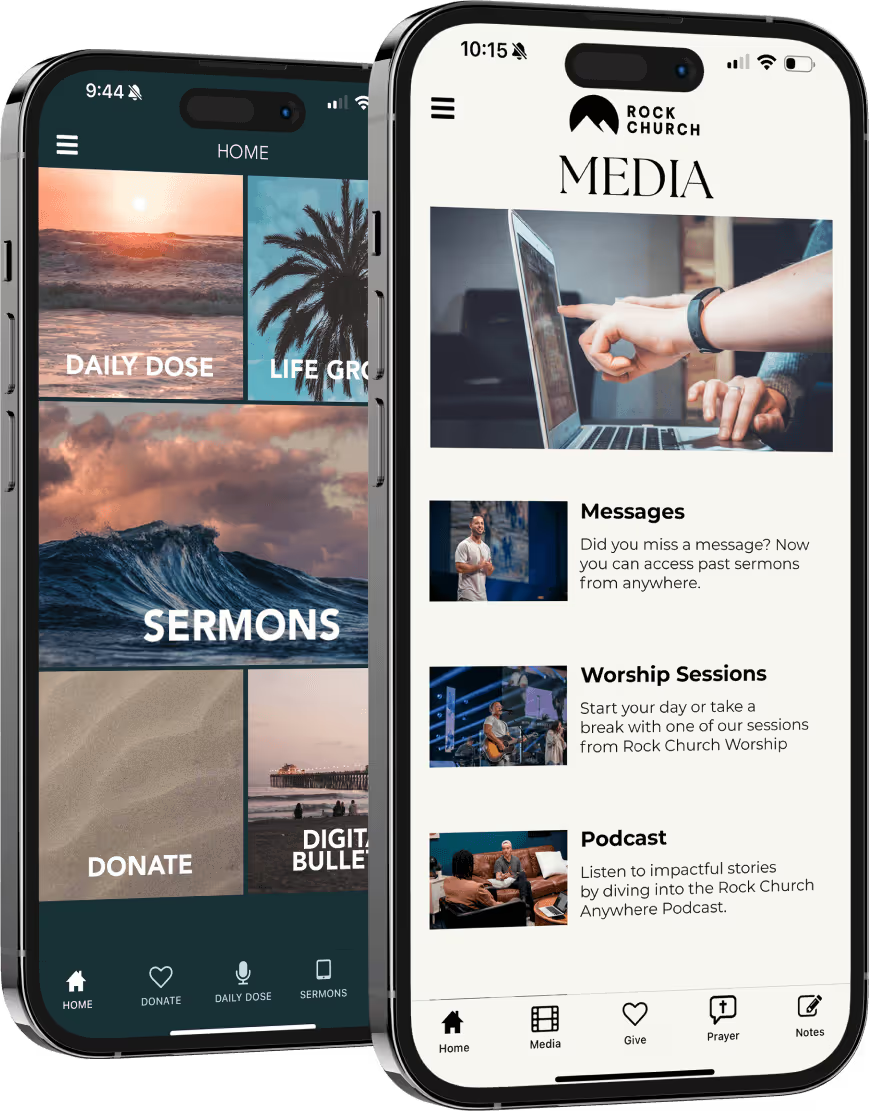
If you are using Tithely’s Church App, log in and open the drag-and-drop builder. From there, you can add your church’s content, colors, and branding (all without needing a developer!) All you need is your ministry vision and a focused plan.
Start with the core sections you identified in Week 1, and resist the temptation to add more tabs than necessary so things don’t get overly complex. Most churches should prioritize:
• Sermons
• Events
• Giving
• Small Groups
• Prayer Requests
As you build, open the app on your own phone and test it repeatedly. Ask yourself:
• Can I find Sunday’s message in under 10 seconds?
• Can I register for an event in three taps or fewer?
• Is giving clearly visible on the home screen?
Next, ensure your branding feels consistent. Upload your church logo, and use the same photos and language tone your congregation recognizes from your website and weekend slides.
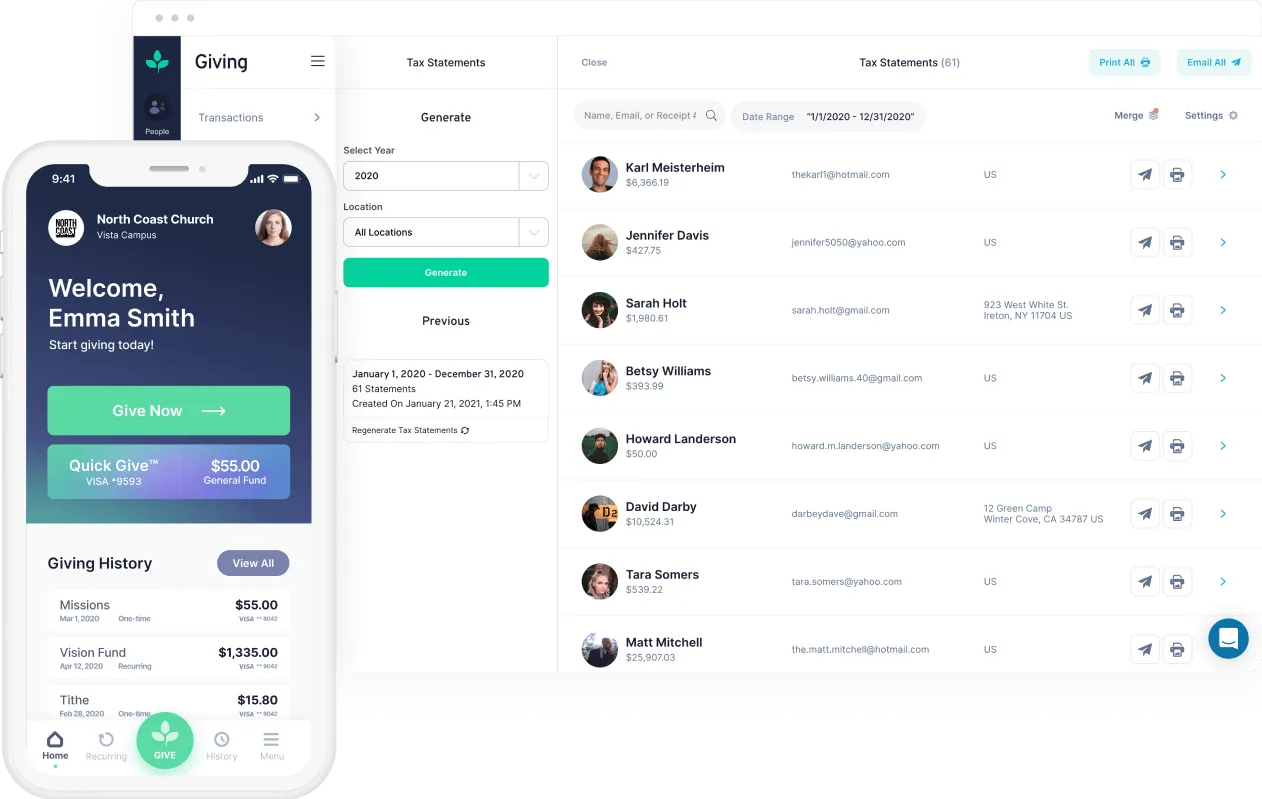
One of the most powerful aspects of Tithely’s Church App is that it is already integrated with Tithely’s Church Management Software. You are not piecing together separate systems. When someone registers for an event in the app, it updates automatically in your database. When someone joins a small group, it syncs instantly. When someone gives, the record is already organized in the same system your team uses every week.
By the end of Week 2, your app should be fully built, branded, and connected to your ChMS so that everything your congregation does inside the app is reflected behind the scenes.
Week 3: Evaluate and Refine
Week three is all about refinement. At this stage, your app should be built and connected. Now your goal is to make it better!
Start by inviting a small group of staff members and trusted volunteers to use the app as if they were members of your congregation. Ask them to move through it naturally. Let them search for a sermon. Let them try to register for an event. Let them submit a prayer request or explore small groups. Watch where they pause, and listen to what feels unclear.
Typically, the most important improvements are small ones. A button may need to be moved higher on the home screen, or an event description might need to be shortened. These small refinements dramatically improve the experience for everyone.
This is also the week to confirm that everything is syncing properly inside your system. Because Tithely’s Church App is already integrated with Tithely’s Church Management Software, actions inside the app should reflect automatically in your database. Event registrations, group sign-ups, and giving all flow into one organized system. If you have questions along the way or need help optimizing your setup, your Tithely support team is there to guide you. You are not navigating this process alone.
Week 4: Introduce and Integrate
Make that next step as simple as possible. Display a QR code on the screen during service that links directly to the download page. Include the QR code in your bulletin, on seat backs, on signage in the lobby, and even on connection cards. The easier you make it, the more likely people are to follow through.
After launch Sunday, continue gently pointing people back to the app. When you announce an event, remind them they can find all the details there. When you talk about giving, let them know it is simple and secure inside the app. When someone asks where to rewatch last week’s message, guide them to the app.
Over time, using the app will become second nature to your congregation. What once required multiple links, emails, and reminders will now live in one consistent place.
Ready to Get Started?
If communication at your church feels scattered, this is your opportunity to simplify it. With a clear game plan and the simple, drag-and-drop church app builder from Tithely, you can have your church app fully built, integrated, and launched within 30 days.
Ready to take the next step? Download the free Church App Launch Guide to walk through the process with your team, or start building today with a free 30-day trial.
Sign Up for Product Updates

Susanna is a theological content writer with a Master of Arts in Intercultural Studies from Fuller Theological Seminary. She is passionate about ministry, running, and exploring new cultures through international travel. In her free time, you’ll find her surfing, obsessing over the Olympics, or enjoying the San Diego sunshine!
If you’ve ever stood near the connect booth at your church while people asked questions, you know just how often the same ones get repeated: Where do I sign up for events? How do I give online? Can I rewatch last week’s message? Where’s the church calendar?
The issue is not that your church has failed to communicate – it is simply that the communication has been scattered. Some information lives on the church website, some is buried in email, and some is posted on social media. Other details were accessible through a QR code that disappeared as soon as the service ended. People usually don’t need more communication. They just need one clear, consistent place to go for information.
This is where a custom church app can be a game-changer for your church’s communication strategy. Instead of searching for links or stopping by a booth, your congregation can watch sermons, give, check events, submit prayer requests, and stay connected – all from their phones. And the best part? Launching one is much more doable than most churches think.
Here’s how you can launch your custom church app in just 30 days!
Your 30-Day Church App Launch Plan
Week 1: Clarify Purpose
Before building your custom church app, take time to clarify what communication challenges you are trying to solve. What would serve your congregation best right now? Where are people experiencing friction? Where are the same questions surfacing again and again?
Most churches discover that their needs are beautifully simple. Access to sermons. Clear event information. An easy way to give. A way to submit prayer requests.
You do not need to build everything at once. Start with two to three objectives to start, and commit to doing those well.
This first week should also be practical. Gather your branding elements. Review your current communication channels. Identify what can be streamlined or consolidated. Thoughtful preparation now will create cohesion later.
Week 2: Design with Intention
Once you’ve clarified your purpose, it’s time to build out your church app.
If you are using Tithely’s Church App, log in and open the drag-and-drop builder. From there, you can add your church’s content, colors, and branding (all without needing a developer!) All you need is your ministry vision and a focused plan.
Start with the core sections you identified in Week 1, and resist the temptation to add more tabs than necessary so things don’t get overly complex. Most churches should prioritize:
• Sermons
• Events
• Giving
• Small Groups
• Prayer Requests
As you build, open the app on your own phone and test it repeatedly. Ask yourself:
• Can I find Sunday’s message in under 10 seconds?
• Can I register for an event in three taps or fewer?
• Is giving clearly visible on the home screen?
Next, ensure your branding feels consistent. Upload your church logo, and use the same photos and language tone your congregation recognizes from your website and weekend slides.
One of the most powerful aspects of Tithely’s Church App is that it is already integrated with Tithely’s Church Management Software. You are not piecing together separate systems. When someone registers for an event in the app, it updates automatically in your database. When someone joins a small group, it syncs instantly. When someone gives, the record is already organized in the same system your team uses every week.
By the end of Week 2, your app should be fully built, branded, and connected to your ChMS so that everything your congregation does inside the app is reflected behind the scenes.
Week 3: Evaluate and Refine
Week three is all about refinement. At this stage, your app should be built and connected. Now your goal is to make it better!
Start by inviting a small group of staff members and trusted volunteers to use the app as if they were members of your congregation. Ask them to move through it naturally. Let them search for a sermon. Let them try to register for an event. Let them submit a prayer request or explore small groups. Watch where they pause, and listen to what feels unclear.
Typically, the most important improvements are small ones. A button may need to be moved higher on the home screen, or an event description might need to be shortened. These small refinements dramatically improve the experience for everyone.
This is also the week to confirm that everything is syncing properly inside your system. Because Tithely’s Church App is already integrated with Tithely’s Church Management Software, actions inside the app should reflect automatically in your database. Event registrations, group sign-ups, and giving all flow into one organized system. If you have questions along the way or need help optimizing your setup, your Tithely support team is there to guide you. You are not navigating this process alone.
Week 4: Introduce and Integrate
Make that next step as simple as possible. Display a QR code on the screen during service that links directly to the download page. Include the QR code in your bulletin, on seat backs, on signage in the lobby, and even on connection cards. The easier you make it, the more likely people are to follow through.
After launch Sunday, continue gently pointing people back to the app. When you announce an event, remind them they can find all the details there. When you talk about giving, let them know it is simple and secure inside the app. When someone asks where to rewatch last week’s message, guide them to the app.
Over time, using the app will become second nature to your congregation. What once required multiple links, emails, and reminders will now live in one consistent place.
Ready to Get Started?
If communication at your church feels scattered, this is your opportunity to simplify it. With a clear game plan and the simple, drag-and-drop church app builder from Tithely, you can have your church app fully built, integrated, and launched within 30 days.
Ready to take the next step? Download the free Church App Launch Guide to walk through the process with your team, or start building today with a free 30-day trial.
podcast transcript
Susanna is a theological content writer with a Master of Arts in Intercultural Studies from Fuller Theological Seminary. She is passionate about ministry, running, and exploring new cultures through international travel. In her free time, you’ll find her surfing, obsessing over the Olympics, or enjoying the San Diego sunshine!
If you’ve ever stood near the connect booth at your church while people asked questions, you know just how often the same ones get repeated: Where do I sign up for events? How do I give online? Can I rewatch last week’s message? Where’s the church calendar?
The issue is not that your church has failed to communicate – it is simply that the communication has been scattered. Some information lives on the church website, some is buried in email, and some is posted on social media. Other details were accessible through a QR code that disappeared as soon as the service ended. People usually don’t need more communication. They just need one clear, consistent place to go for information.
This is where a custom church app can be a game-changer for your church’s communication strategy. Instead of searching for links or stopping by a booth, your congregation can watch sermons, give, check events, submit prayer requests, and stay connected – all from their phones. And the best part? Launching one is much more doable than most churches think.
Here’s how you can launch your custom church app in just 30 days!
Your 30-Day Church App Launch Plan
Week 1: Clarify Purpose
Before building your custom church app, take time to clarify what communication challenges you are trying to solve. What would serve your congregation best right now? Where are people experiencing friction? Where are the same questions surfacing again and again?
Most churches discover that their needs are beautifully simple. Access to sermons. Clear event information. An easy way to give. A way to submit prayer requests.
You do not need to build everything at once. Start with two to three objectives to start, and commit to doing those well.
This first week should also be practical. Gather your branding elements. Review your current communication channels. Identify what can be streamlined or consolidated. Thoughtful preparation now will create cohesion later.
Week 2: Design with Intention
Once you’ve clarified your purpose, it’s time to build out your church app.
If you are using Tithely’s Church App, log in and open the drag-and-drop builder. From there, you can add your church’s content, colors, and branding (all without needing a developer!) All you need is your ministry vision and a focused plan.
Start with the core sections you identified in Week 1, and resist the temptation to add more tabs than necessary so things don’t get overly complex. Most churches should prioritize:
• Sermons
• Events
• Giving
• Small Groups
• Prayer Requests
As you build, open the app on your own phone and test it repeatedly. Ask yourself:
• Can I find Sunday’s message in under 10 seconds?
• Can I register for an event in three taps or fewer?
• Is giving clearly visible on the home screen?
Next, ensure your branding feels consistent. Upload your church logo, and use the same photos and language tone your congregation recognizes from your website and weekend slides.
One of the most powerful aspects of Tithely’s Church App is that it is already integrated with Tithely’s Church Management Software. You are not piecing together separate systems. When someone registers for an event in the app, it updates automatically in your database. When someone joins a small group, it syncs instantly. When someone gives, the record is already organized in the same system your team uses every week.
By the end of Week 2, your app should be fully built, branded, and connected to your ChMS so that everything your congregation does inside the app is reflected behind the scenes.
Week 3: Evaluate and Refine
Week three is all about refinement. At this stage, your app should be built and connected. Now your goal is to make it better!
Start by inviting a small group of staff members and trusted volunteers to use the app as if they were members of your congregation. Ask them to move through it naturally. Let them search for a sermon. Let them try to register for an event. Let them submit a prayer request or explore small groups. Watch where they pause, and listen to what feels unclear.
Typically, the most important improvements are small ones. A button may need to be moved higher on the home screen, or an event description might need to be shortened. These small refinements dramatically improve the experience for everyone.
This is also the week to confirm that everything is syncing properly inside your system. Because Tithely’s Church App is already integrated with Tithely’s Church Management Software, actions inside the app should reflect automatically in your database. Event registrations, group sign-ups, and giving all flow into one organized system. If you have questions along the way or need help optimizing your setup, your Tithely support team is there to guide you. You are not navigating this process alone.
Week 4: Introduce and Integrate
Make that next step as simple as possible. Display a QR code on the screen during service that links directly to the download page. Include the QR code in your bulletin, on seat backs, on signage in the lobby, and even on connection cards. The easier you make it, the more likely people are to follow through.
After launch Sunday, continue gently pointing people back to the app. When you announce an event, remind them they can find all the details there. When you talk about giving, let them know it is simple and secure inside the app. When someone asks where to rewatch last week’s message, guide them to the app.
Over time, using the app will become second nature to your congregation. What once required multiple links, emails, and reminders will now live in one consistent place.
Ready to Get Started?
If communication at your church feels scattered, this is your opportunity to simplify it. With a clear game plan and the simple, drag-and-drop church app builder from Tithely, you can have your church app fully built, integrated, and launched within 30 days.
Ready to take the next step? Download the free Church App Launch Guide to walk through the process with your team, or start building today with a free 30-day trial.
VIDEO transcript
If you’ve ever stood near the connect booth at your church while people asked questions, you know just how often the same ones get repeated: Where do I sign up for events? How do I give online? Can I rewatch last week’s message? Where’s the church calendar?
The issue is not that your church has failed to communicate – it is simply that the communication has been scattered. Some information lives on the church website, some is buried in email, and some is posted on social media. Other details were accessible through a QR code that disappeared as soon as the service ended. People usually don’t need more communication. They just need one clear, consistent place to go for information.
This is where a custom church app can be a game-changer for your church’s communication strategy. Instead of searching for links or stopping by a booth, your congregation can watch sermons, give, check events, submit prayer requests, and stay connected – all from their phones. And the best part? Launching one is much more doable than most churches think.
Here’s how you can launch your custom church app in just 30 days!
Your 30-Day Church App Launch Plan
Week 1: Clarify Purpose
Before building your custom church app, take time to clarify what communication challenges you are trying to solve. What would serve your congregation best right now? Where are people experiencing friction? Where are the same questions surfacing again and again?
Most churches discover that their needs are beautifully simple. Access to sermons. Clear event information. An easy way to give. A way to submit prayer requests.
You do not need to build everything at once. Start with two to three objectives to start, and commit to doing those well.
This first week should also be practical. Gather your branding elements. Review your current communication channels. Identify what can be streamlined or consolidated. Thoughtful preparation now will create cohesion later.
Week 2: Design with Intention
Once you’ve clarified your purpose, it’s time to build out your church app.
If you are using Tithely’s Church App, log in and open the drag-and-drop builder. From there, you can add your church’s content, colors, and branding (all without needing a developer!) All you need is your ministry vision and a focused plan.
Start with the core sections you identified in Week 1, and resist the temptation to add more tabs than necessary so things don’t get overly complex. Most churches should prioritize:
• Sermons
• Events
• Giving
• Small Groups
• Prayer Requests
As you build, open the app on your own phone and test it repeatedly. Ask yourself:
• Can I find Sunday’s message in under 10 seconds?
• Can I register for an event in three taps or fewer?
• Is giving clearly visible on the home screen?
Next, ensure your branding feels consistent. Upload your church logo, and use the same photos and language tone your congregation recognizes from your website and weekend slides.
One of the most powerful aspects of Tithely’s Church App is that it is already integrated with Tithely’s Church Management Software. You are not piecing together separate systems. When someone registers for an event in the app, it updates automatically in your database. When someone joins a small group, it syncs instantly. When someone gives, the record is already organized in the same system your team uses every week.
By the end of Week 2, your app should be fully built, branded, and connected to your ChMS so that everything your congregation does inside the app is reflected behind the scenes.
Week 3: Evaluate and Refine
Week three is all about refinement. At this stage, your app should be built and connected. Now your goal is to make it better!
Start by inviting a small group of staff members and trusted volunteers to use the app as if they were members of your congregation. Ask them to move through it naturally. Let them search for a sermon. Let them try to register for an event. Let them submit a prayer request or explore small groups. Watch where they pause, and listen to what feels unclear.
Typically, the most important improvements are small ones. A button may need to be moved higher on the home screen, or an event description might need to be shortened. These small refinements dramatically improve the experience for everyone.
This is also the week to confirm that everything is syncing properly inside your system. Because Tithely’s Church App is already integrated with Tithely’s Church Management Software, actions inside the app should reflect automatically in your database. Event registrations, group sign-ups, and giving all flow into one organized system. If you have questions along the way or need help optimizing your setup, your Tithely support team is there to guide you. You are not navigating this process alone.
Week 4: Introduce and Integrate
Make that next step as simple as possible. Display a QR code on the screen during service that links directly to the download page. Include the QR code in your bulletin, on seat backs, on signage in the lobby, and even on connection cards. The easier you make it, the more likely people are to follow through.
After launch Sunday, continue gently pointing people back to the app. When you announce an event, remind them they can find all the details there. When you talk about giving, let them know it is simple and secure inside the app. When someone asks where to rewatch last week’s message, guide them to the app.
Over time, using the app will become second nature to your congregation. What once required multiple links, emails, and reminders will now live in one consistent place.
Ready to Get Started?
If communication at your church feels scattered, this is your opportunity to simplify it. With a clear game plan and the simple, drag-and-drop church app builder from Tithely, you can have your church app fully built, integrated, and launched within 30 days.
Ready to take the next step? Download the free Church App Launch Guide to walk through the process with your team, or start building today with a free 30-day trial.
Sign Up for Product Updates
Susanna is a theological content writer with a Master of Arts in Intercultural Studies from Fuller Theological Seminary. She is passionate about ministry, running, and exploring new cultures through international travel. In her free time, you’ll find her surfing, obsessing over the Olympics, or enjoying the San Diego sunshine!

You Might Also Like
More Resources

From increasing giving, managing your congregation, and engaging your church, our collection of resources will keep you up-to-date on the latest church and ministry trends.
Free Resources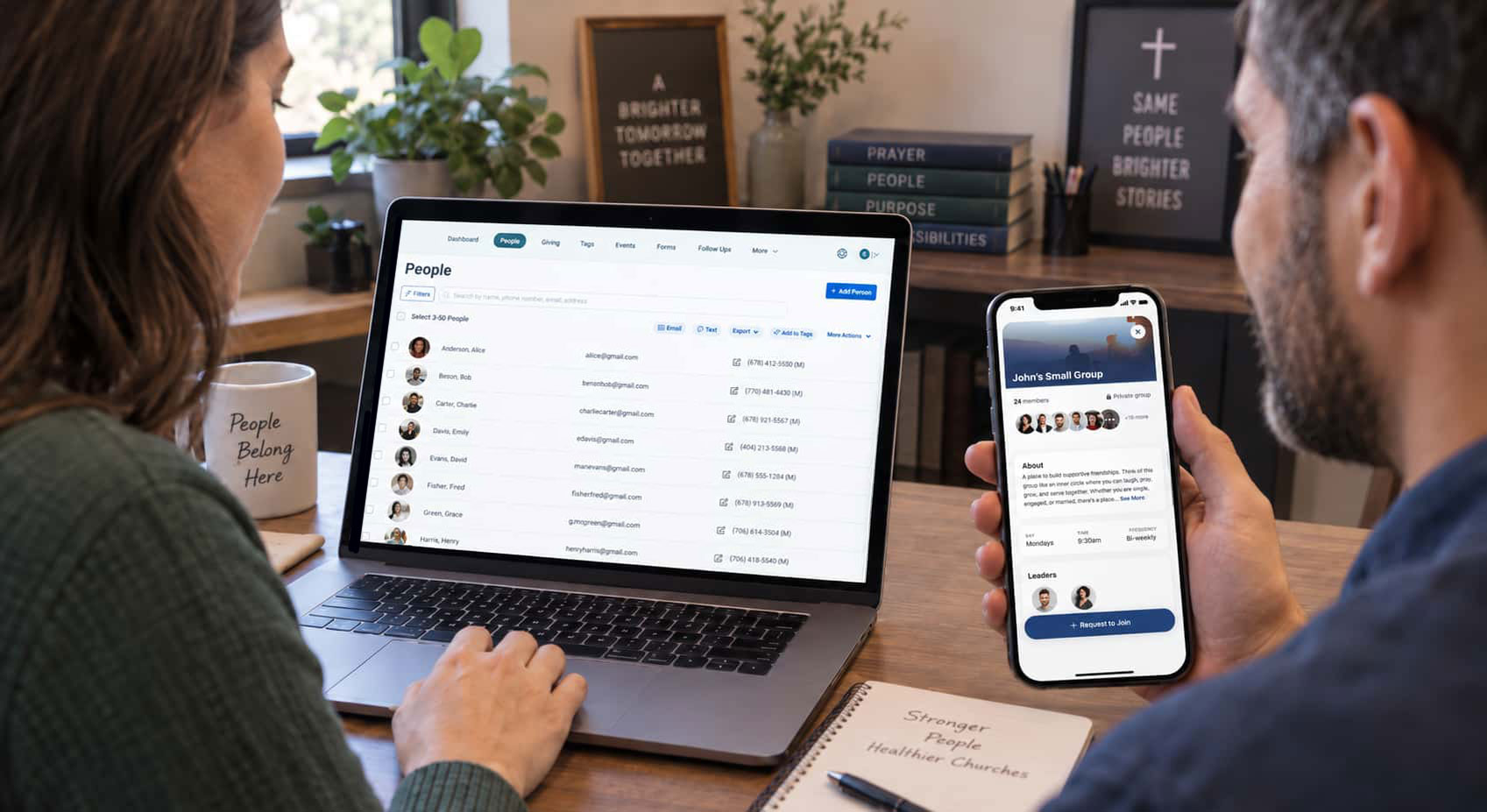

.jpg)